How to Calculate Amazon FBA Fees: Complete Guide (2026)
Accurate fee calculation is the difference between profitable products and money-losing mistakes. A product that looks profitable at a glance can actually lose money once you account for Amazon's fee structure.
This guide walks through the exact process to calculate FBA fees, with real examples and the formulas you need.
Need a quick single-product check? Use the free Amazon FBA calculator to estimate fees, profit, margin, and ROI by ASIN.
Why Accurate Calculation Matters
Consider this product:
- Your cost: $12.00
- Amazon selling price: $29.99
- Apparent profit: $17.99
Looks great, right? Let's see what happens with actual fee calculation:
| Fee | Amount |
|---|---|
| Referral fee (15%) | $4.50 |
| FBA fee (1 lb standard) | $5.05 |
| Prep + inbound | $1.00 |
| Storage (monthly) | $0.20 |
| Total fees | $10.75 |
| Actual profit | $7.24 |
Still profitable, but 60% less than the apparent profit. And we haven't accounted for returns, advertising, or price fluctuations.
The Complete FBA Fee Formula
Net Profit = Selling Price - Product Cost - Referral Fee - FBA Fee
             - Prep Cost - Inbound Shipping - Storage Fee - Other Costs
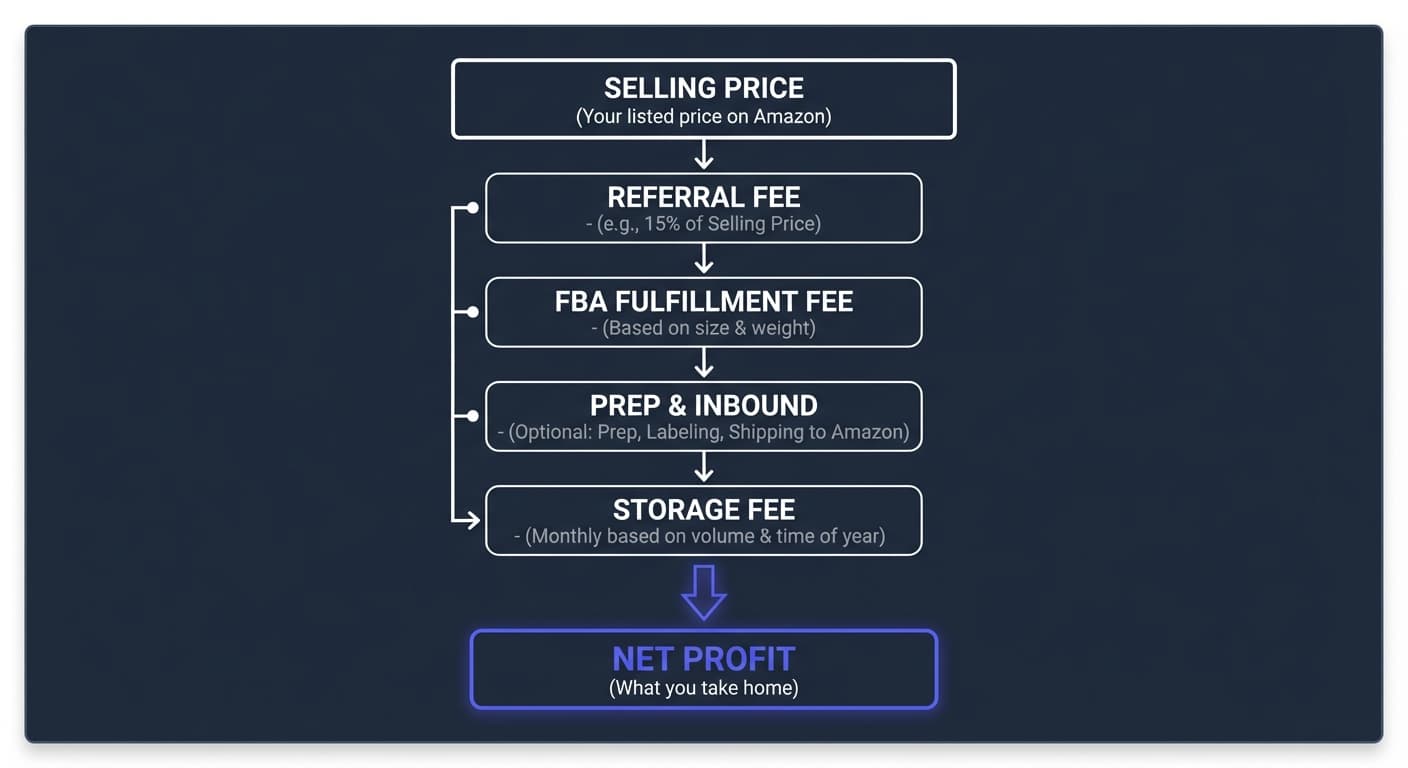
Let's calculate each component.
Step 1: Determine Product Size Tier
FBA fees are based on product size tier. You need accurate dimensions and weight.
Measuring Your Product
Measure the packaged product (how it will be shipped to customers):
- Length: Longest side
- Width: Second longest side
- Height: Shortest side
- Weight: Actual shipping weight
Size Tier Thresholds (2026)
| Size Tier | Max Length | Max Width | Max Height | Max Weight |
|---|---|---|---|---|
| Small Standard | 15" | 12" | 0.75" | 1 lb |
| Large Standard | 18" | 14" | 8" | 20 lb |
| Large Bulky | 59" | 33" | 33" | 50 lb |
| Extra-Large | 108" | N/A | N/A | 150 lb |
Important: If ANY dimension exceeds the tier limits, the product moves to the next tier up. A 16" item is Large Standard even if it weighs 8 oz.

Dimensional Weight
For large standard and above, Amazon may use dimensional weight instead of actual weight:
Dimensional Weight (lb) = (Length x Width x Height) / 139
Amazon charges based on the greater of actual weight or dimensional weight.
Example:
- Product: 16" x 12" x 6" box, actual weight 2 lb
- Dimensional weight: (16 x 12 x 6) / 139 = 8.3 lb
- FBA fee based on: 8.3 lb (dimensional is higher)
Step 2: Look Up the FBA Fulfillment Fee
Once you know the size tier and shipping weight, find the corresponding fee.
Small Standard Size Fees (2026)
| Shipping Weight | FBA Fee |
|---|---|
| 2 oz or less | $3.06 |
| 2-4 oz | $3.15 |
| 4-6 oz | $3.24 |
| 6-8 oz | $3.33 |
| 8-10 oz | $3.43 |
| 10-12 oz | $3.53 |
| 12-14 oz | $3.60 |
| 14-16 oz | $3.65 |
Large Standard Size Fees (2026)
| Shipping Weight | FBA Fee |
|---|---|
| 4 oz or less | $3.68 |
| 4-8 oz | $3.90 |
| 8-12 oz | $4.15 |
| 12 oz - 1 lb | $4.55 |
| 1-1.5 lb | $5.05 |
| 1.5-2 lb | $5.40 |
| 2-2.5 lb | $5.70 |
| 2.5-3 lb | $6.05 |
| 3+ lb | $6.05 + $0.32 per additional half-pound |
Large Bulky Fees
Base fee: $9.61
Additional: $0.38 per pound above 1 lb
Example: 15 lb large bulky item
- Fee: $9.61 + ($0.38 x 14) = $9.61 + $5.32 = $14.93
Extra-Large Fees
| Weight Range | Fee Formula |
|---|---|
| 0-50 lb | $26.33 + $0.38/lb above first lb |
| 50-70 lb | $40.12 + $0.75/lb above 51 lb |
| 70-150 lb | $54.90 + $0.75/lb above 71 lb |
Step 3: Calculate Referral Fee
The referral fee is Amazon's commission on every sale.
Formula
Referral Fee = Selling Price x Category Rate
Common Category Rates
| Category | Rate |
|---|---|
| Most categories | 15% |
| Consumer Electronics | 8% |
| Personal Computers | 6% |
| Health & Personal Care | 8% (<=$10), 15% (>$10) |
| Beauty | 8% (<=$10), 15% (>$10) |
| Grocery | 8% (<=$15), 15% (>$15) |
| Clothing & Accessories | 17% |
| Jewelry | 20% (<=$250), 5% (>$250) |
Minimum Referral Fee
Most categories have a $0.30 minimum. For very low-priced items:
Example: $1.99 item in 15% category
- Calculated fee: $1.99 x 0.15 = $0.30
- Since $0.30 = minimum, fee is $0.30
For a $1.50 item:
- Calculated fee: $1.50 x 0.15 = $0.23
- Since $0.23 < $0.30 minimum, fee is $0.30
Step 4: Estimate Storage Fees
Storage fees apply to all inventory sitting in Amazon's warehouses.
Monthly Storage Rates
| Period | Standard-Size | Oversize |
|---|---|---|
| January-September | $0.78/cu ft | $0.56/cu ft |
| October-December | $2.40/cu ft | $1.40/cu ft |
Storage Fee Formula
Monthly Storage = Volume (cu ft) x Rate x Average Units Stored
Calculating Cubic Feet
Cubic Feet = (Length x Width x Height in inches) / 1728
Example:
- Product: 10" x 8" x 4"
- Cubic feet: (10 x 8 x 4) / 1728 = 0.185 cu ft
- 50 units stored in March: 0.185 x $0.78 x 50 = $7.22/month
Per-Unit Storage Allocation
To factor storage into per-unit profitability:
Storage per Unit = (Cubic feet x Monthly rate) / Monthly turnover
Example: If you sell 50 units/month and store 50 units:
- Storage per unit: $7.22 / 50 = $0.14/unit
Fast-turning inventory has minimal storage cost impact. Slow-moving inventory kills profits.
Aged Inventory Surcharges
Don't forget surcharges for inventory over 180 days:
| Days | Surcharge/cu ft |
|---|---|
| 181-210 | $0.50 |
| 211-240 | $1.00 |
| 241-270 | $1.50 |
| 271-300 | $2.00 |
| 301-330 | $2.50 |
| 331-365 | $3.00 |
| 365+ | $6.90 |
Step 5: Add Prep and Inbound Costs
Prep Costs
If you prep yourself:
- FNSKU labels: ~$0.05-0.10/unit
- Poly bags: ~$0.05-0.15/unit
- Bubble wrap: ~$0.15-0.30/unit
- Boxes/packaging: ~$0.10-0.50/unit
If using a prep center:
- Basic labeling: $0.15-0.30/unit
- Full FBA prep: $0.75-2.00/unit
See our FBA Prep Center Database for pricing details.
Inbound Shipping
Cost to ship inventory to Amazon:
| Method | Typical Cost |
|---|---|
| Small parcel (UPS/FedEx) | $0.50-1.50/unit |
| Partnered carrier rates | $0.30-0.80/unit |
| LTL (pallets) | $0.15-0.40/unit |
For calculation purposes, estimate $0.50-1.00/unit for most standard-size products.
Putting It All Together: Complete Examples
Example 1: Small Standard Item
Product: Phone case
- Dimensions: 6" x 4" x 0.5"
- Weight: 3 oz
- Your cost: $3.00
- Selling price: $12.99
- Category: Cell phone accessories (15%)
Calculation:
| Component | Amount |
|---|---|
| Selling price | $12.99 |
| Product cost | -$3.00 |
| Referral fee (15%) | -$1.95 |
| FBA fee (small standard, 2-4 oz) | -$3.15 |
| Prep (DIY) | -$0.15 |
| Inbound shipping | -$0.30 |
| Storage (minimal, fast seller) | -$0.05 |
| Net profit | $4.39 |
| Margin | 34% |
| ROI | 127% |
Example 2: Large Standard Item
Product: Bluetooth speaker
- Dimensions: 8" x 6" x 4"
- Weight: 1.8 lb
- Your cost: $18.00
- Selling price: $44.99
- Category: Electronics (8%)
Calculation:
| Component | Amount |
|---|---|
| Selling price | $44.99 |
| Product cost | -$18.00 |
| Referral fee (8%) | -$3.60 |
| FBA fee (large standard, 1.5-2 lb) | -$5.40 |
| Prep (prep center) | -$0.85 |
| Inbound shipping | -$0.60 |
| Storage | -$0.15 |
| Net profit | $16.39 |
| Margin | 36% |
| ROI | 84% |
Example 3: Large Bulky Item
Product: Outdoor furniture cushion set
- Dimensions: 24" x 20" x 12"
- Weight: 8 lb
- Your cost: $35.00
- Selling price: $89.99
- Category: Patio & Garden (15%)
Calculation:
| Component | Amount |
|---|---|
| Selling price | $89.99 |
| Product cost | -$35.00 |
| Referral fee (15%) | -$13.50 |
| FBA fee (large bulky, 8 lb) | -$12.27 |
| Prep (outsourced, oversized) | -$2.50 |
| Inbound shipping (LTL) | -$2.00 |
| Storage (bulky, 1 month) | -$1.50 |
| Net profit | $23.22 |
| Margin | 26% |
| ROI | 57% |
Note: Large bulky items can still be profitable, but storage costs and FBA fees eat more margin.
Why Manual Calculation Doesn't Scale
The examples above take 5-10 minutes each to calculate properly. Now imagine:
- A supplier sends you a price list with 3,000 products
- You need to identify the profitable ones
- Each requires dimension lookup, fee calculation, profit analysis
At 5 minutes per product: 250 hours of work for one supplier list.
This is why Amazon wholesale sellers use bulk analysis tools.
Tools for Fee Calculation
Rocket Source FBA Calculator (Free)
Use the free Amazon FBA calculator when you want a fast ASIN-based estimate with profit, margin, ROI, and a fee breakdown.
Best for: Single-product checks before you run a deeper supplier scan
Amazon Revenue Calculator (Free)
Amazon's official tool for single-product calculations.
How to use:
- Go to Seller Central Revenue Calculator
- Enter ASIN or product details
- Input your cost
- View fee breakdown and profit
Limitations:
- One product at a time
- Requires manual input
- No bulk capability
Best for: Spot-checking individual products
RocketSource (Bulk Analysis)
Built for wholesale sellers processing supplier price lists.
How it works:
- Upload CSV with product identifiers (UPC, ASIN) and costs
- System automatically:
- Converts UPCs to ASINs
- Looks up current Amazon prices
- Calculates all fees
- Computes profit/ROI
- Download results with profitability for every product
Best for: Analyzing supplier lists with hundreds or thousands of products
Free tier: 50,000 UPC conversions per week
When to Use Which
| Situation | Tool |
|---|---|
| Checking one product | Amazon Revenue Calculator |
| Small list (<50 products) | Either works |
| Supplier price list (100+ products) | RocketSource or similar bulk tool |
| Regular wholesale analysis | Bulk tool essential |
Common Calculation Mistakes
1. Forgetting Dimensional Weight
A light but bulky product may have higher fees than expected because dimensional weight exceeds actual weight.
2. Wrong Category Rate
Double-check your product's category. A product you think is "Electronics" (8%) might actually be classified as "Everything Else" (15%).
3. Ignoring Prep and Inbound
These "small" costs add up:
- 100 units x $1.00 prep = $100
- 100 units x $0.50 inbound = $50
- $150 that needs to come from profit
4. Underestimating Storage
Fast sellers: minimal impact
Slow sellers: storage can exceed product cost over time
5. Not Accounting for Returns
Budget 3-8% of sales for returns depending on category. Returned units may be unsellable.
6. Using Old Fee Data
Amazon updates fees annually (sometimes more). Use current year rates.
Profitability Thresholds
Minimum Targets
| Metric | Minimum | Preferred |
|---|---|---|
| Net margin | 15% | 20%+ |
| ROI | 30% | 50%+ |
| Profit per unit | $3 | $5+ |
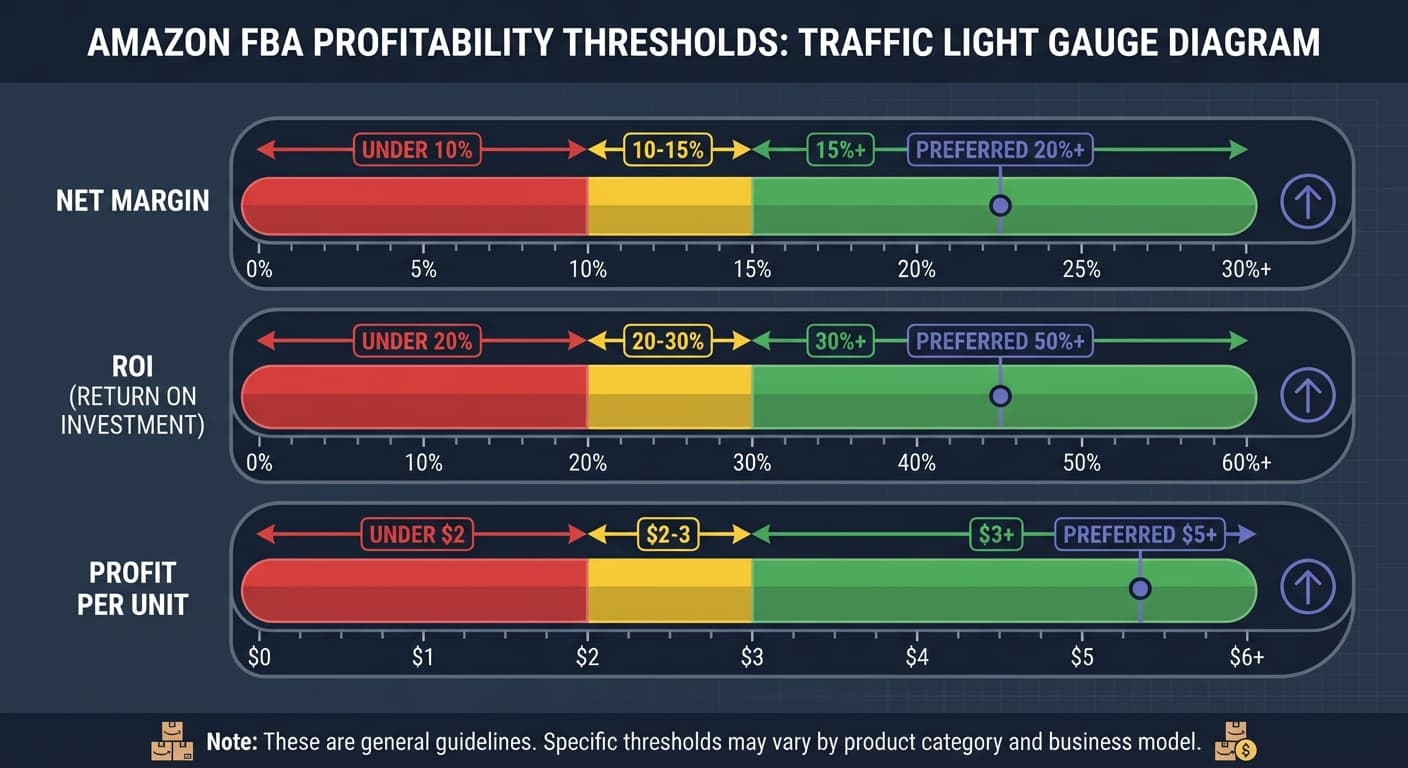
When to Pass on a Product
- Net margin < 10%: Too little room for error
- ROI < 20%: Capital better deployed elsewhere
- Profit < $2/unit: Not worth the handling
Building in Margin for Error
Real-world factors that erode calculated profit:
- Price drops from competition
- Returns
- Storage fees if slower than expected
- Advertising costs
Build 5-10% buffer into your minimum targets.
Frequently Asked Questions
How often do FBA fees change?
Amazon typically updates FBA fees annually in February. Storage fee adjustments and other changes may happen throughout the year. Always verify against current fee schedules.
Do fees differ for new vs. established sellers?
No. Amazon's fee structure is the same for all sellers. Established sellers may have negotiated better rates with prep centers or shipping carriers, but Amazon fees are identical.
How do I handle products with variable dimensions?
For products sold in different configurations (multipacks, bundles), calculate fees for each variation separately. The smallest profitable configuration may not scale to larger bundles.
Should I include advertising in my calculations?
Yes, if you plan to advertise. Many products require PPC to maintain visibility. Budget 10-20% of revenue for advertising costs in competitive categories.
What about FBA fee discounts?
Amazon occasionally offers fee reductions for new products, specific categories, or promotional periods. Don't count on these for baseline profitability. Treat them as bonus margin.
Quick Reference Formulas
Referral Fee = Selling Price x Category Rate

FBA Fee = Look up by Size Tier + Weight

Storage Fee = Cubic Feet x Monthly Rate x Units

Dimensional Weight = (L x W x H) / 139

Cubic Feet = (L x W x H) / 1728

Net Profit = Price - Cost - Referral - FBA - Prep - Inbound - Storage

ROI = Net Profit / Total Cost x 100

Margin = Net Profit / Selling Price x 100
Next Steps
- Free Amazon FBA Calculator for single-product fee, profit, margin, and ROI checks
- Amazon Seller Fees Breakdown for a complete fee reference
- Amazon Wholesale Guide to build a profitable wholesale business
- Free UPC Converter to start analyzing products
- FBA Prep Database to find prep services and pricing
Want to calculate fees automatically for thousands of products?
Upload supplier price lists, get quick profitability analysis with all fees calculated automatically. 50,000 free conversions per week, no credit card required.