Best Amazon Seller Tools: Build a Lean Software Stack for 2026
Updated October 6, 2026
Amazon seller tools should help you find products, check profit, or cut repetitive work. Before adding another subscription, decide which job you need it to do.
This guide covers six tool categories and when each one is useful, so you can build a software stack that fits how you sell.
Quick answer
The best Amazon seller tool stack covers five jobs: finding products, checking demand and price stability, calculating true profit, managing inventory, and protecting the account. Start with the tools included in Seller Central, then add software only where it removes a repeated manual step.
How to Choose
Before adding another subscription, make sure the tool passes these practical checks.
- It solves a task you repeat regularly.
- It shows enough detail to explain why a product passes or fails.
- It handles the number of products you review each week.
- It supports your marketplace and fulfillment method.
- You can use or export the results in your next step.
- The time or risk it saves is worth more than the subscription cost.
1. Wholesale and Supplier List Analysis
Supplier catalogs often arrive as CSV or Excel files with hundreds or thousands of products. Checking each UPC by hand takes time, and it is easy to miss fees, selling restrictions, price changes, or an incorrect listing match.
Rocket Source matches your supplier file to Amazon listings, calculates profit and ROI, and adds historical pricing context. Filter the results to find products worth a closer look, then check the shortlist before you buy.
If you are comparing options, our guide to wholesale scanning tools covers the differences to look for.
- Match UPCs, EANs, ISBNs, and ASINs in bulk
- Include FBA and referral fees in your calculations
- Filter by profit, margin, and ROI
- Check historical pricing before relying on today's price
- Exclude brands and products you do not want to sell
- Export your shortlist as a CSV

2. Seller Central Tools
Before paying for another app, learn what Amazon already includes. Seller Central covers listings, inventory, orders, account health, business reports, fee estimates, and growth recommendations.
These tools help you run your account, but they are not built to analyze a distributor spreadsheet with thousands of rows. Use specialist sourcing software when you need to review a full catalog.
For smaller tasks, an AI coding assistant can help you build a simple utility to reformat supplier files, automate repetitive checks, or create a custom report. Test the output before relying on it for buying decisions.
Another AI route is connecting an assistant such as Claude or ChatGPT to live marketplace data. AMZScout Skill + MCP connector does this for product validation, keyword discovery, and competitor research, so the assistant works with real Amazon data instead of general knowledge.
3. Product Research Tools
Product research tools serve different jobs. Private-label sellers look for niches and unmet demand. Wholesale and arbitrage sellers need to validate a specific listing, its offers, fees, and price history.
Choose a tool that fits how you source. A niche research platform may help you develop a new product, but it will not necessarily help you work through a large supplier catalog.
For products you already have in mind, check Amazon price history to see whether today's selling price is typical or a temporary spike.
4. Fee and Profit Calculators
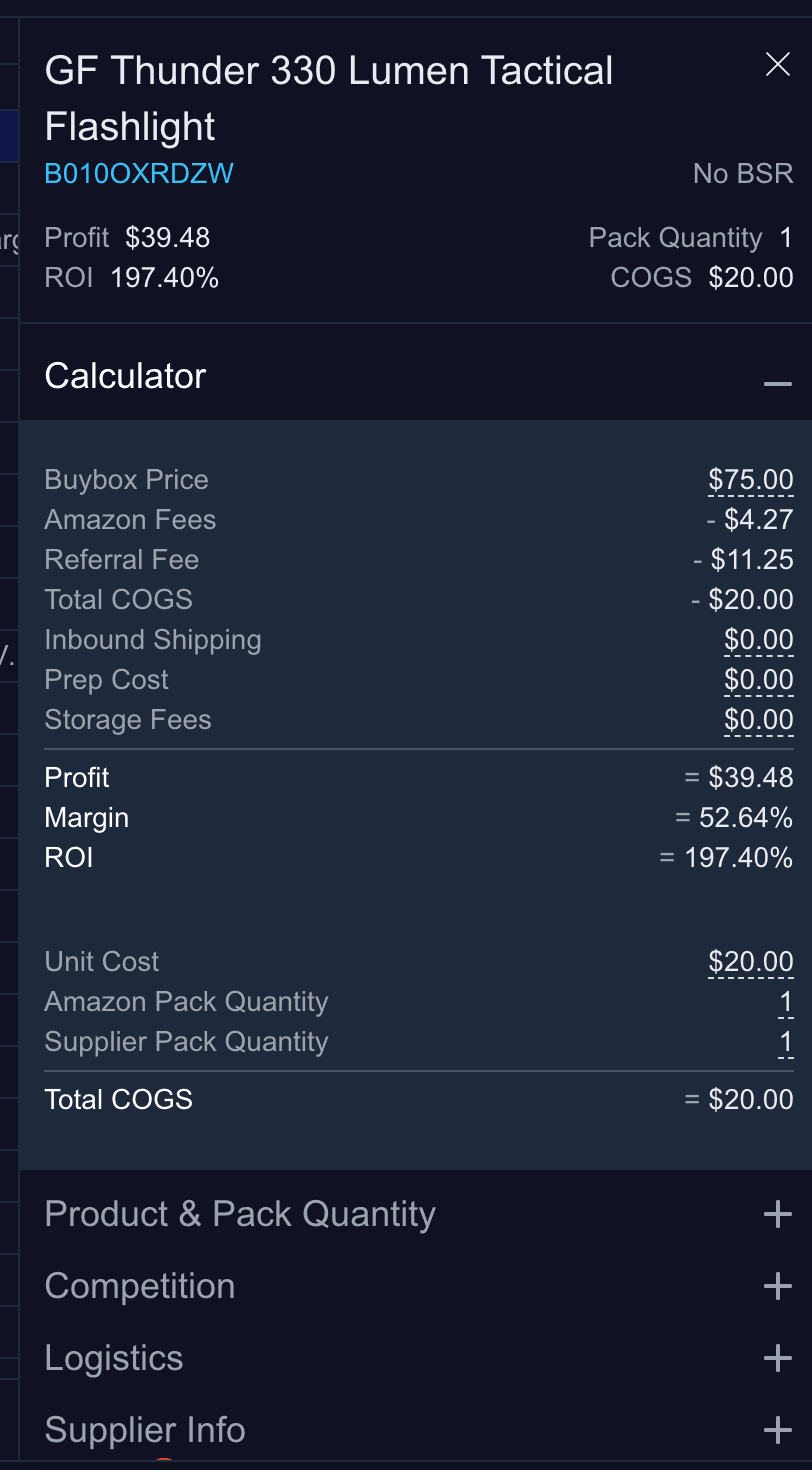
The gap between the selling price and supplier cost is not your profit. Amazon seller fees, storage, inbound shipping, prep, returns, and tax can eat into that margin.
Use a free FBA calculator to check individual products. For a full supplier catalog, use bulk analysis to apply the same cost assumptions to every row.
5. Identifier and Catalog Tools
Supplier files may contain UPCs, EANs, ISBNs, model numbers, or a mix of identifiers. Match those codes to the correct Amazon listing before calculating profit.
For occasional lookups, use a UPC to ASIN converter to find the matching Amazon listing.
If your supplier uses European barcodes, an EAN to ASIN converter handles the same task.
For recurring imports, an ASIN and barcode API can connect identifier matching to your own tools. A bulk scanner handles matching and profitability analysis together.
6. Repricing, Inventory, and Accounting
Once your products are listed, you need tools to manage them. Repricing software helps you adjust offer prices. Inventory tools help you avoid stockouts and over-ordering. Accounting tools organize marketplace transactions for bookkeeping and tax.
Add these tools when the manual work becomes hard to manage. A new seller with a few products has different needs from a team managing thousands of SKUs.
A Practical Stack by Seller Type
Private-label sellers usually focus on niche discovery, keywords, advertising, and listing optimization. Online arbitrage sellers need quick checks on price history, selling restrictions, and profit. Wholesale sellers need catalog matching, bulk profitability analysis, supplier management, and inventory planning.
Choose tools for the work you do today. Before adding a subscription, name the task it will replace and decide whether the time saved is worth the cost.
Turn a Supplier Catalog Into a Shortlist
Rocket Source matches supplier identifiers to Amazon listings, calculates profit and ROI, adds historical pricing context, and helps you filter large catalogs without checking every row by hand.
Compare Rocket Source plansRelated Guides and Tools
- Amazon price tracker for sellers
- Amazon wishlist downloader and CSV template
- Best Amazon bulk analysis tools
- Rocket Source vs Seller Assistant
- Amazon wholesale business guide
- Rocket Source pricing
Official Amazon Resources
FAQ
What is the best Amazon seller tool?
The best tool depends on the repeated task slowing you down. Wholesale sellers often need bulk supplier-list analysis, while private-label sellers may need niche and keyword research. Start with Seller Central, then add specialist software around your business model.
Do new Amazon sellers need paid software?
Not immediately. Seller Central and free calculators can cover the basics. Paid software becomes worthwhile when it saves repeated manual work, reduces sourcing risk, or handles more products than you can review one by one.
Which tools do Amazon wholesale sellers need?
A practical wholesale stack usually includes supplier catalog matching, fee and ROI calculations, historical pricing context, restriction checks, inventory management, and accounting. Bulk analysis is especially important when catalogs contain thousands of products.
How many Amazon seller tools should I use?
Use the smallest stack that covers your workflow. Overlapping subscriptions add cost and create conflicting data. Each tool should own a clear job and pass useful output into the next step.