What Is a GTIN? Global Trade Item Numbers Explained (UPC vs GTIN)
When listing products on Amazon, you'll encounter the term "GTIN"—often alongside UPC, EAN, and other barcode acronyms. Understanding GTINs is essential because Amazon requires them for most product listings, and confusion about these identifiers can delay your ability to sell.
This guide explains what GTINs are, how they relate to UPCs and other barcodes, and how to navigate Amazon's GTIN requirements.
What Is a GTIN?
GTIN stands for Global Trade Item Number. It's not a specific barcode type—it's an umbrella term that covers several standardized product identification numbers used worldwide.
Think of "GTIN" as a category, like "vehicle." Just as vehicles include cars, trucks, and motorcycles, GTINs include UPCs, EANs, ISBNs, and other barcode formats.
Key Points About GTINs
- GTIN is an umbrella term: It encompasses multiple barcode formats
- GS1 manages the standard: The global standards organization GS1 administers GTIN assignment
- Unique product identification: Each GTIN should identify one specific product configuration
- Global recognition: GTINs are recognized by retailers worldwide, not just Amazon

Types of GTINs
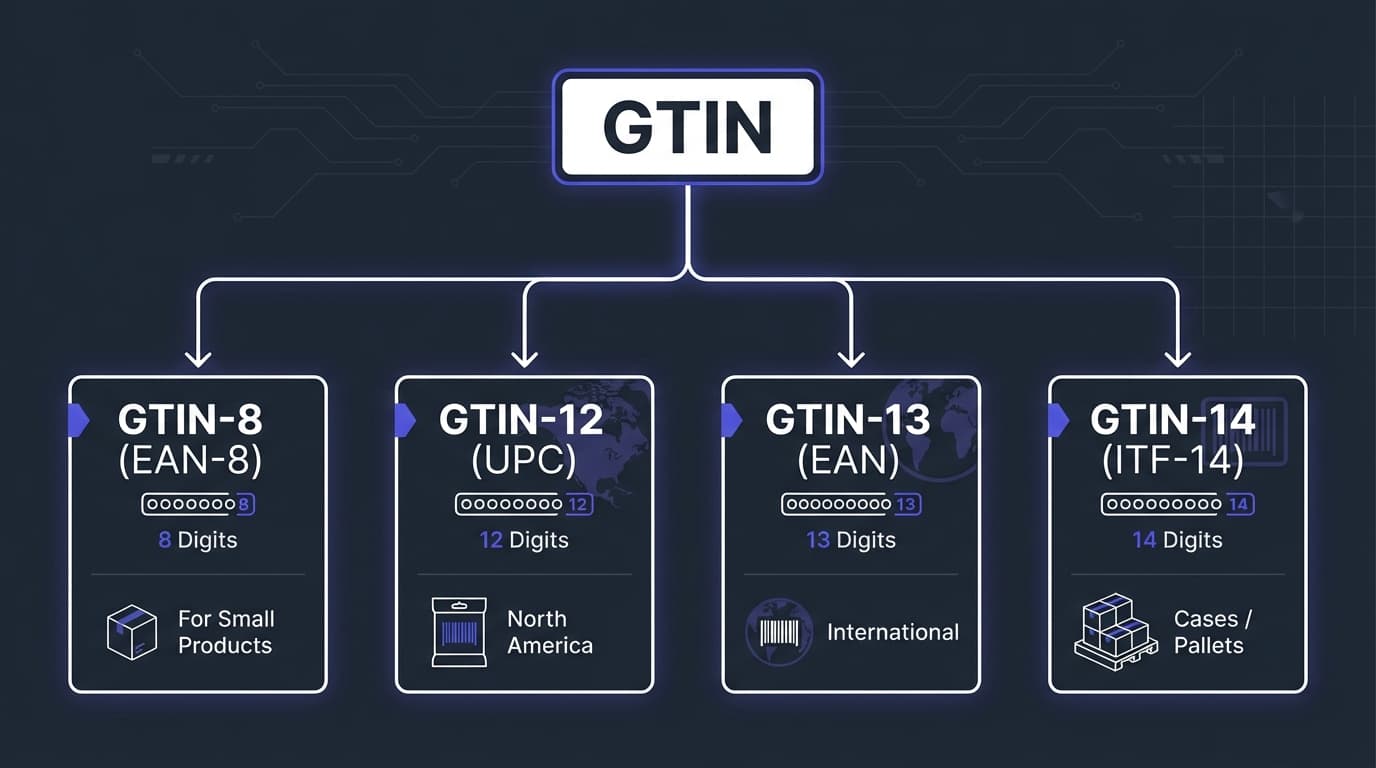
GTINs come in four formats, distinguished by their length. Each serves different purposes:
| Type | Digits | Also Known As | Common Use |
|---|---|---|---|
| GTIN-8 | 8 digits | EAN-8 | Very small products where space is limited |
| GTIN-12 | 12 digits | UPC-A, UPC | Standard retail products in North America |
| GTIN-13 | 13 digits | EAN, EAN-13, JAN (Japan) | Standard retail products internationally |
| GTIN-14 | 14 digits | ITF-14 | Cases, cartons, pallets (outer packaging) |
GTIN-12 (UPC)
The most common GTIN in North America. If you buy a product at a US store and scan the barcode, it's almost certainly a UPC (GTIN-12).
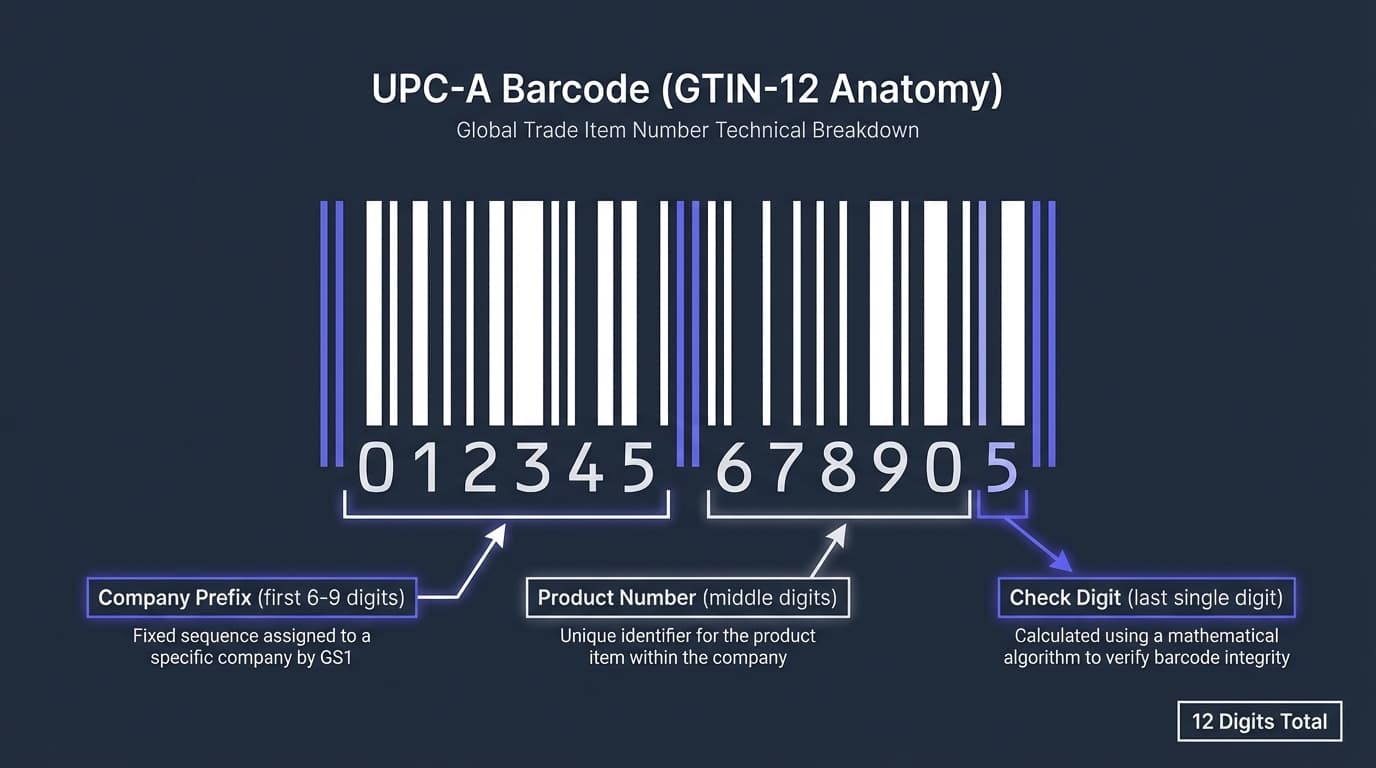
Format: 12 numeric digits
Example: 012345678905
Structure:
- First 6-10 digits: Company prefix (assigned by GS1)
- Remaining digits (before last): Product number (assigned by company)
- Last digit: Check digit (calculated for error detection)
GTIN-13 (EAN)
The international standard, used throughout Europe, Asia, and most of the world outside North America.
Format: 13 numeric digits
Example: 5901234123457
Note: A UPC can be converted to EAN by adding a leading zero. 012345678905 (UPC) = 0012345678905 (EAN)
GTIN-8 (EAN-8)
A shortened format for products too small for a standard barcode (think individual pieces of candy or small cosmetics).
Format: 8 numeric digits
Example: 96385074
GTIN-14 (ITF-14)
Used for trade units like cases and pallets—the outer packaging that contains multiple retail units.
Format: 14 numeric digits (adds packaging indicator to GTIN-13)
Example: 10012345678902
GTIN vs UPC: What's the Difference?
This is the most common point of confusion. A UPC is a type of GTIN. Specifically, it's a GTIN-12.
Quick Comparison
| Aspect | GTIN | UPC |
|---|---|---|
| What it is | Category of identifiers | Specific 12-digit identifier |
| Includes | UPC, EAN, ISBN, etc. | Only UPC |
| Digit length | 8, 12, 13, or 14 | Always 12 |
| Primary use region | Global | North America |
| Can they overlap? | Yes, all UPCs are GTINs | Yes, UPC is a GTIN-12 |
Practical Implication
When Amazon asks for a "GTIN," you can provide a UPC if you have one. They're asking for any valid product identifier from the GTIN family.
Why Amazon Requires GTINs
Amazon requires GTINs for most product listings. Understanding why helps you navigate their requirements:
1. Catalog Accuracy
GTINs help Amazon match products correctly. When you enter a UPC, Amazon can verify you're listing the right product and connect your offer to the existing product page.
2. Counterfeit Prevention
Valid GTINs from GS1 provide a paper trail of legitimacy. Counterfeiters can't easily generate valid GTINs, making it harder to list fake products.
3. Brand Registry Integration
Brand owners can register their GTINs with Amazon, enabling better brand protection and control over their product listings.
4. Search and Discovery
GTINs help customers find products. Someone who scans a barcode or searches by UPC can find the exact product on Amazon.
How to Get a GTIN
If you need a GTIN for your products, here are your options:
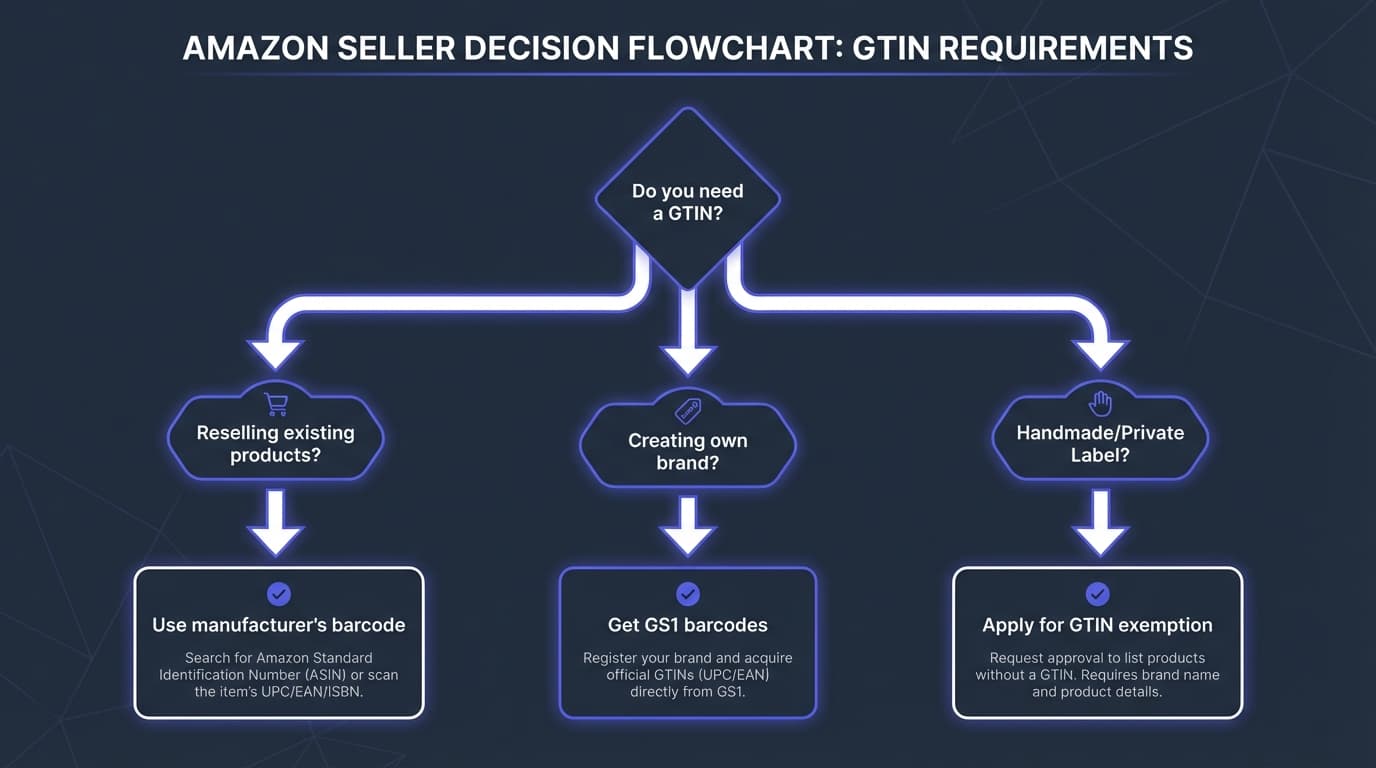
Option 1: GS1 (Official Source)
GS1 is the only official source for GTINs. They assign unique company prefixes that ensure your barcodes won't conflict with others.
GS1 US Pricing (2026):
| Number of Barcodes | Initial Fee | Annual Renewal |
|---|---|---|
| 1-10 | $250 | $50 |
| Up to 100 | $750 | $150 |
| Up to 1,000 | $2,500 | $500 |
| Up to 10,000 | $6,500 | $1,300 |
When to use GS1:
- You're creating your own branded products
- You plan to sell through multiple retailers (not just Amazon)
- You need barcodes recognized by any retailer worldwide
- You're building a long-term brand
Option 2: Third-Party Barcode Resellers
Companies sell "recycled" UPCs at lower prices. These are controversial because:
- Pros: Much cheaper ($5-50 for single barcodes)
- Cons: Not officially assigned to you; may cause issues with some retailers; GS1 doesn't support them; potential conflicts if original owner reuses
Amazon's position: Amazon accepts barcodes from legitimate sources but recommends GS1. Some sellers have had issues with reseller barcodes, while others use them without problems.
Our recommendation: For serious brand building, use GS1. For testing products or one-off listings, reseller barcodes may suffice—but understand the risks.
Option 3: GTIN Exemption
Some products don't require GTINs. Amazon offers exemptions for specific cases (see next section).
When You Don't Need a GTIN
Not every product requires a GTIN on Amazon. You may qualify for an exemption if:
GTIN Exemption Categories
- Handmade products: Items you make yourself
- Parts and accessories: Some generic parts without standard barcodes
- Private label in certain categories: Some categories allow exemption applications
- Products that never had barcodes: Vintage items, certain collectibles
- Product bundles: Unique bundles you create may qualify
How to Apply for GTIN Exemption
- Go to Seller Central → Catalog → Add Products
- Click "I'm adding a product not sold on Amazon"
- Select your category
- Look for "Apply for GTIN exemption"
- Provide required information (brand name, product images, etc.)
Note: Exemptions are granted per brand, per category. You may need to apply multiple times for different product types.
Requirements for Exemption Approval
Amazon typically requires:
- Product images showing the actual item
- Brand name (even if unregistered)
- Legitimate business reasons for not having a GTIN
Approval isn't guaranteed, and standards vary by category.
GTINs and Amazon's Product Catalog
Understanding how GTINs interact with Amazon's catalog helps avoid listing issues:
How Amazon Uses GTINs
- Product matching: When you enter a GTIN, Amazon checks if that product already exists
- ASIN assignment: If the product exists, you're matched to that ASIN; if not, Amazon may create a new ASIN
- Data validation: Amazon may verify the GTIN against GS1's database
- Brand protection: GTINs help identify brand ownership
Common GTIN Issues
- "GTIN already in use": The product exists—search for it and add your offer
- "Invalid GTIN": Check digit may be wrong, or format is incorrect
- "GTIN doesn't match product": Amazon's data shows a different product for that GTIN
- Brand registry blocks: Brand owner has restricted who can use their GTINs
Converting Between UPC and EAN
Since UPCs and EANs are both GTINs, they can be converted:
UPC to EAN
Add a leading zero:
UPC: 012345678905
EAN: 0012345678905
EAN to UPC
Only works if the EAN starts with 0. Remove the leading zero:
EAN: 0012345678905
UPC: 012345678905

EAN: 5901234123457 (starts with 5)
Cannot convert to UPC (would need 12-digit format)
Converting GTINs to Amazon ASINs
For Amazon sellers, the critical conversion is GTIN to ASIN. Use our free tools:
- UPC to ASIN Converter — For North American products (GTIN-12)
- EAN to ASIN Converter — For international products (GTIN-13)
- ISBN to ASIN Converter — For books (ISBN-10 or ISBN-13)
GTINs for Wholesale Sellers
If you're reselling existing branded products, GTIN considerations differ from private label. See our UPC to Amazon Lookup Guide for detailed methods.
You Don't Need Your Own GTINs
When selling existing products, you use the manufacturer's GTIN (the barcode already on the product). You match to the existing Amazon listing.
What You Need Instead
- UPC-to-ASIN conversion: Convert supplier UPCs to Amazon ASINs for analysis
- Restriction checking: Verify you can sell the ASIN before sourcing
- Profitability analysis: Calculate fees and margins
Our free UPC to ASIN converter handles the conversion—upload your supplier list with UPCs and get matching ASINs for Amazon research.
When Wholesale Sellers Need GTINs
You might need your own GTIN if:
- Creating bundles of multiple products
- Repackaging products into new configurations
- The product exists but has no GTIN on record
Validating GTINs
Before using a GTIN, verify it's valid. Invalid GTINs cause listing errors.
Check Digit Calculation
Every GTIN has a check digit (the last number) calculated from the other digits. If someone copied a barcode incorrectly, the check digit won't match.
Manual check: Use GS1's check digit calculator or online validators
GS1 Verification
GS1 offers a "GTIN Cloud" service where you can verify whether a GTIN is registered and to whom.
Amazon Verification
When you enter a GTIN during listing, Amazon validates it. If invalid, you'll receive an error message.
Frequently Asked Questions
Do I need a GTIN if I'm just reselling products?
If the product already exists on Amazon, you don't need your own GTIN—you use the manufacturer's. You only need GTINs for products that don't have barcodes or aren't yet on Amazon.
What's the difference between GTIN and barcode?
A GTIN is the number itself. A barcode is the visual representation (the lines that scanners read). The GTIN is encoded within the barcode, but they're conceptually different things.
Can I use the same GTIN on multiple Amazon marketplaces?
Yes. A UPC used on Amazon.com can also be used on Amazon.co.uk, Amazon.de, etc. The product might get different ASINs in each marketplace, but the GTIN remains the same.
What if my product already has a barcode but Amazon doesn't recognize it?
This sometimes happens with products from smaller manufacturers or international products. Options include:
- Applying for GTIN exemption
- Contacting Amazon support with proof of the product's legitimacy
- Having the manufacturer register their GTIN with GS1
Are Amazon barcodes (FNSKU) the same as GTINs?
No. FNSKU is Amazon's internal identifier for your specific inventory in FBA. GTINs are universal product identifiers. You use GTINs to list products; Amazon uses FNSKUs to track your inventory.
How do I find a product's GTIN?
Check the product packaging—the UPC/EAN barcode shows the GTIN below the bars. On Amazon, look at the "Product Information" section of the listing—UPCs and EANs are usually listed there.
Next Steps
- Free UPC to ASIN Converter — Convert GTIN-12 (UPC) to Amazon ASINs
- Free EAN to ASIN Converter — Convert GTIN-13 (EAN) to Amazon ASINs
- Free ISBN to ASIN Converter — Look up book ASINs in bulk
- What Is an ASIN? — Understand Amazon's product identifiers
- Amazon Barcode Types Explained — UPC, EAN, FNSKU, and when to use each
- Amazon Wholesale Guide — Build a profitable wholesale business
Ready to convert supplier UPCs to Amazon ASINs?
Start Free with RocketSource →
Convert up to 50,000 UPCs per week, analyze supplier price lists, and calculate profitability for every product—no credit card required.