How to Search Amazon by UPC: Complete Lookup Guide
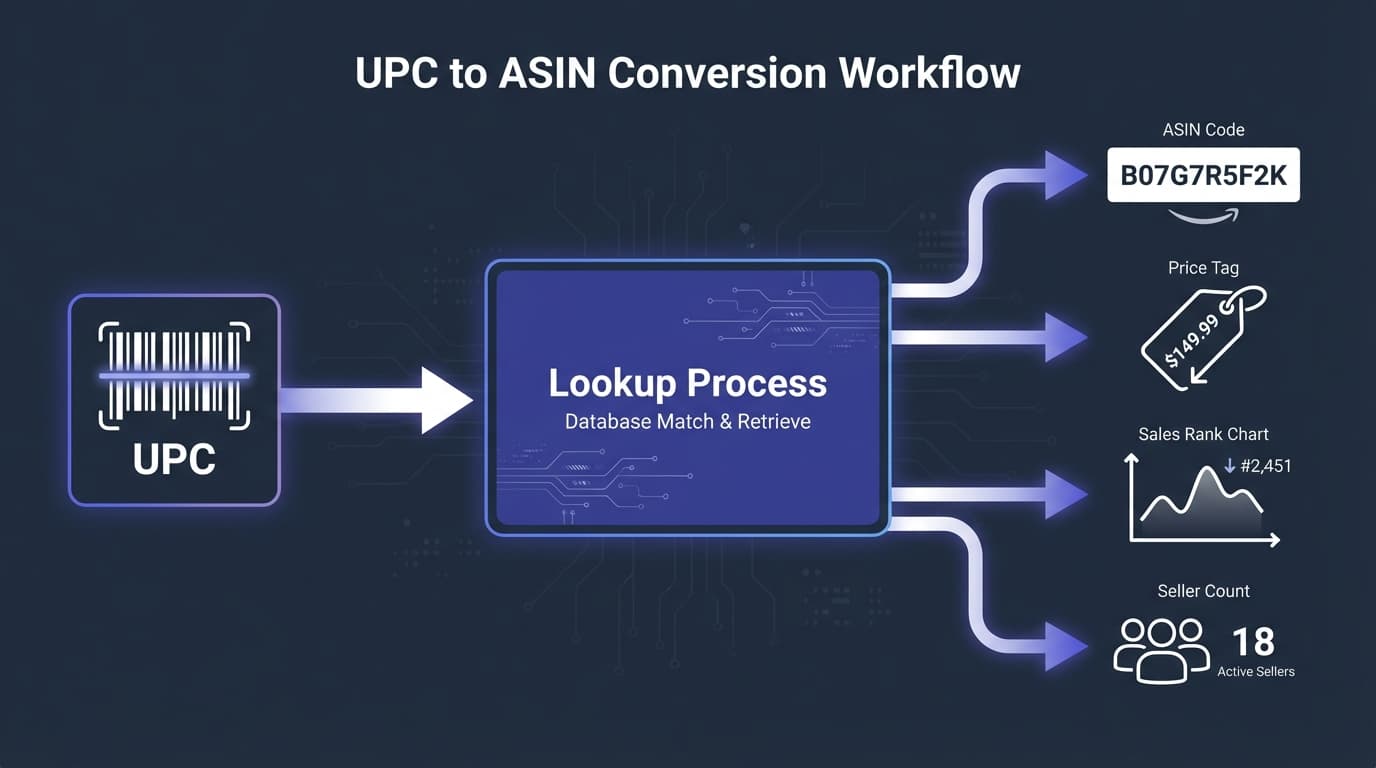
Whether you're a retail arbitrage seller scanning products in stores, a wholesaler analyzing supplier price lists, or just a shopper trying to price-compare, searching Amazon by UPC is one of the most useful skills to master. A UPC (Universal Product Code) uniquely identifies a product, and knowing how to look it up on Amazon reveals pricing, competition, and selling opportunities.
This guide covers every method for finding Amazon products using UPCs—from simple search bar lookups to bulk conversions for wholesale sellers.
Why Search Amazon by UPC?
There are several scenarios where UPC-to-Amazon lookup is essential:

Retail Arbitrage
You find a clearance item at Target. Scan the UPC to instantly see if it sells for more on Amazon. This quick lookup determines whether the deal is worth buying for resale.
Wholesale Sourcing
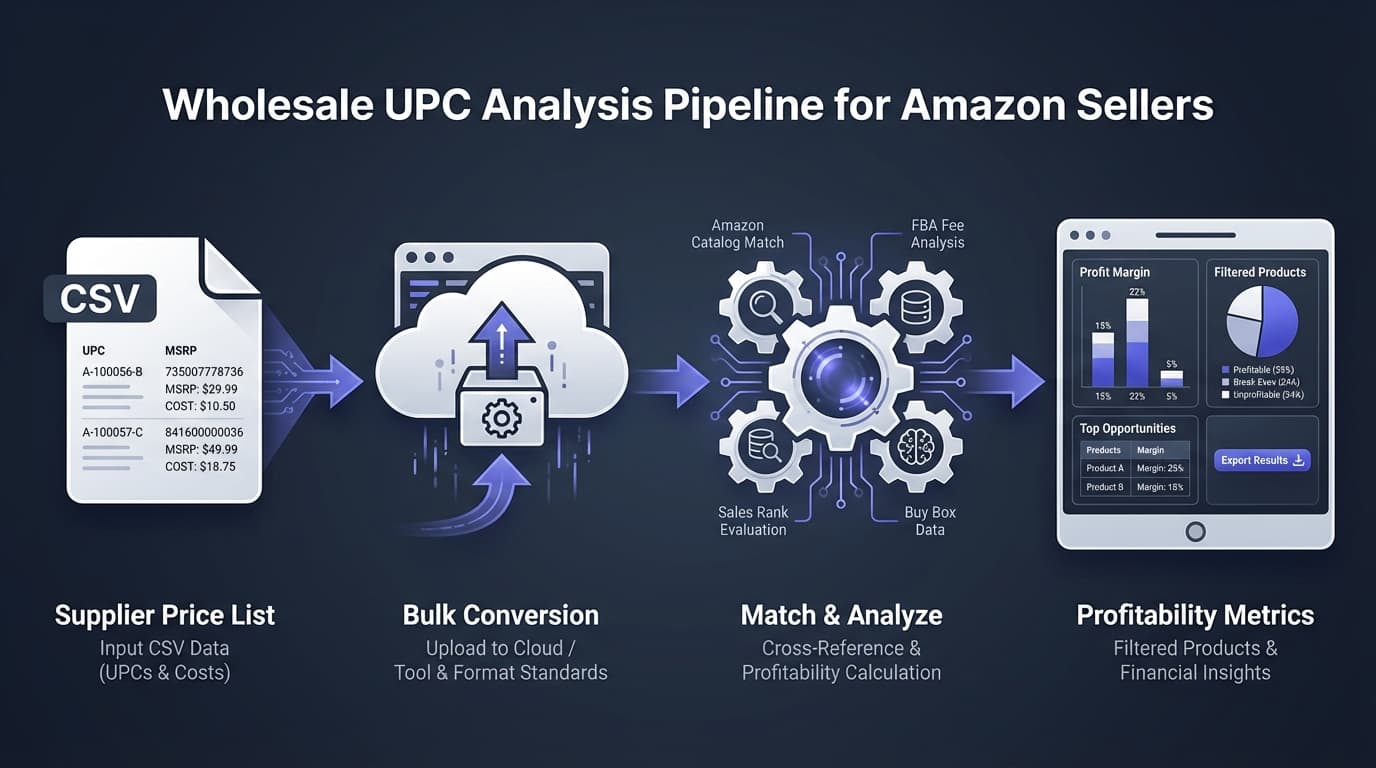
A supplier sends a price list with 3,000 products. Each product has a UPC but no Amazon information. You need to convert these UPCs to Amazon ASINs to analyze which products are profitable.
Online Arbitrage
You spot a deal on a retailer's website. Copy the UPC from the product page and search Amazon to compare pricing and check if you can sell it profitably.
Price Comparison Shopping
Even as a regular consumer, searching by UPC helps find the exact same product across platforms to compare prices.
Product Verification
Confirm that the product you're sourcing matches the Amazon listing. Similar-looking products may have different UPCs and different Amazon pages.
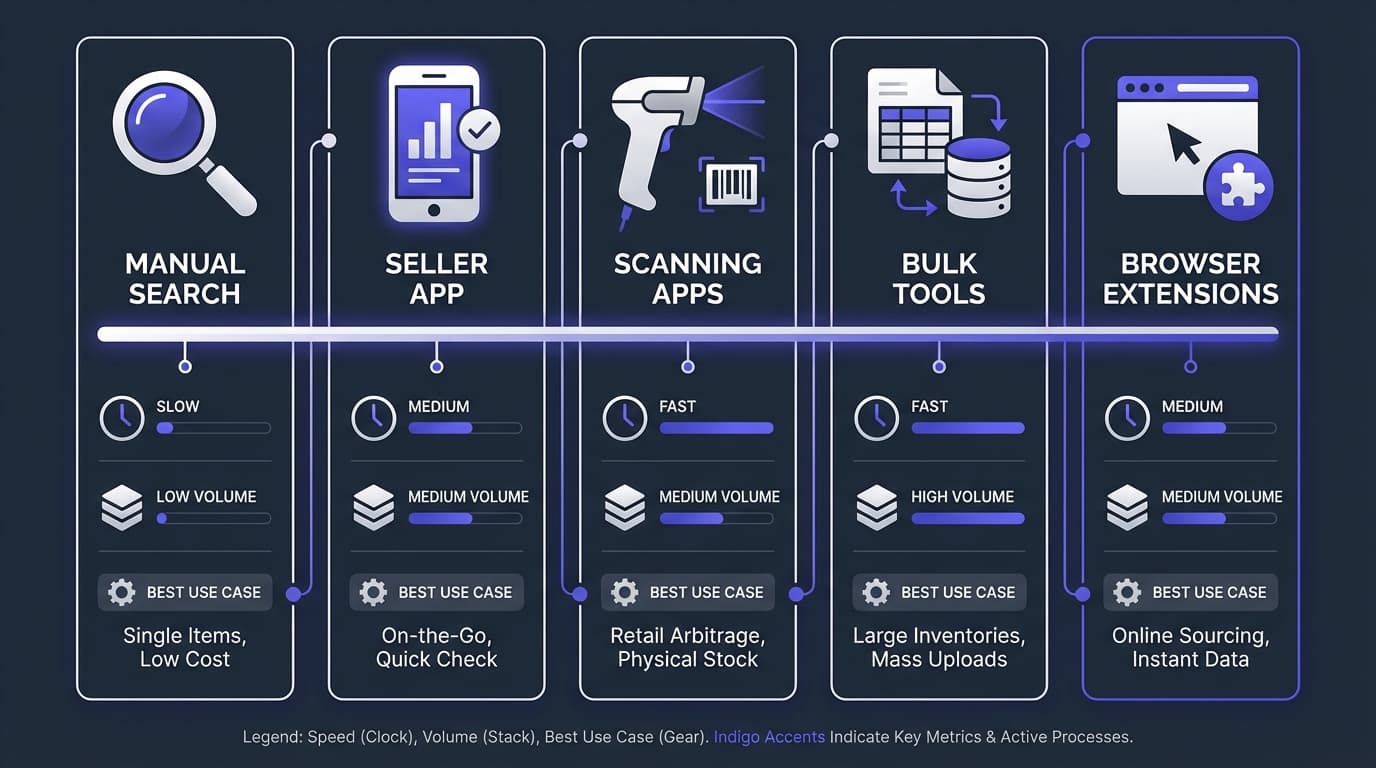
Method 1: Amazon Search Bar (Manual)
The simplest approach—paste a UPC directly into Amazon's search box.
How It Works
- Go to Amazon.com
- Paste the 12-digit UPC into the search bar
- Press Enter
- Amazon shows matching products
What to Expect
- Direct match: Amazon shows the exact product page
- Multiple results: Sometimes variations or related products appear
- No results: Product may not be on Amazon, or UPC isn't in their system
Tips for Better Results
- Try both UPC and EAN: Add a leading zero to convert UPC to EAN (012345678905 → 0012345678905)
- Remove leading zeros: Some systems add zeros—try removing them
- Check the UPC format: Ensure you have all 12 digits
Limitations
- Only works one UPC at a time
- Requires manual copying and pasting
- Impractical for analyzing supplier lists with hundreds of products
- No automatic profitability calculation
Method 2: Amazon Seller App
Amazon's official seller app includes a barcode scanner—perfect for retail arbitrage.
How It Works
- Download the Amazon Seller app (iOS or Android)
- Log in with your seller account
- Tap the camera icon to open the scanner
- Point your phone at the product barcode
- View product details, pricing, and selling eligibility
What You See
- Amazon selling price
- Your potential profit (after entering cost)
- Sales rank
- Number of FBA and FBM sellers
- Whether you're eligible to sell (restrictions)
- FBA fees estimate
Pros
- Free with seller account
- Shows selling restrictions immediately
- Quick profitability estimate
- Works offline for previously scanned items
Cons
- Requires Amazon seller account
- One product at a time
- Not suitable for bulk analysis
- Can be slow in stores with poor signal
Method 3: Third-Party Scanning Apps
Several apps are designed specifically for Amazon sellers scanning in stores.
Popular Options
- Scoutify: Works with InventoryLab for seamless workflow
- Profit Bandit: Dedicated retail arbitrage scanner
- ScoutIQ: Specializes in book scanning
Typical Features
- Faster scanning than Amazon app
- Custom profit thresholds and alerts
- Historical price data
- Trigger lists (buy when specific conditions met)
- Integration with inventory management
Best For
Full-time retail arbitrage sellers who need speed and additional data points beyond what Amazon's app provides.
Method 4: Bulk UPC to ASIN Conversion
For wholesale sellers analyzing supplier price lists, manual lookups don't scale. Bulk conversion tools process thousands of UPCs at once.
How It Works
- Export your supplier's price list (usually Excel or CSV)
- Upload to a bulk conversion tool
- The tool looks up each UPC and finds the matching Amazon ASIN
- Download results with ASINs, prices, and other data
What You Get Back
- ASIN: Amazon's product identifier
- Current price: What the product sells for on Amazon
- Sales rank: How well the product sells
- Number of sellers: Competition level
- FBA fees: What Amazon charges for fulfillment
- Potential profit: Based on your cost input
RocketSource's Approach
Our free UPC to ASIN converter processes up to 50,000 UPCs per week:
- Upload your CSV with UPCs and costs
- Get ASINs plus Amazon pricing data
- Automatic fee calculation and profitability analysis
- Results ready for decision-making
Why Bulk Conversion Matters
A typical wholesale price list has 2,000-10,000 products. Manual lookup at 1 minute per product = 33-166 hours of work. Bulk conversion does it in minutes.
Method 5: Browser Extensions
Browser extensions add UPC lookup functionality when shopping online.
How They Work
- Install the extension in Chrome, Firefox, or Edge
- When viewing a product on a retailer's site, click the extension
- Extension finds the UPC and looks it up on Amazon
- Shows Amazon pricing and basic data
Common Extensions
- RevSeller: Quick Amazon data overlay
- AMZScout: Product research extension
- Jungle Scout: Full product research suite
Best For
Online arbitrage sellers who browse retailer websites looking for deals to flip on Amazon.
What If the UPC Returns No Results?
Sometimes a UPC search comes up empty. Here's why and what to do:
Product Not Listed on Amazon
Why: Not every product is on Amazon. New products, niche items, or products from small manufacturers may not be listed yet.
What to do:
- Could be an opportunity to create the listing (if you have the product)
- Search by product name/brand to verify it's truly not listed
- Check if variations of the product exist under different UPCs
Listing Is Suppressed
Why: Amazon may have suppressed the listing due to policy violations, missing information, or safety concerns.
What to do:
- Try searching by product name
- The product may be listed but not appearing in search results
- May indicate issues—proceed with caution
Different Marketplace
Why: Products sold internationally may have different listings per Amazon marketplace (US, UK, Germany, etc.).
What to do:
- Check other Amazon marketplaces if the product is international
- The same UPC might work on Amazon.co.uk but not Amazon.com
- For international products, try our EAN to ASIN converter instead—EANs are the standard outside North America
UPC Database Mismatch
Why: Amazon's catalog may not have the UPC linked correctly, or there's a data error. Understanding how GTINs work helps troubleshoot these issues.
What to do:
- Try converting UPC to EAN (add leading zero)
- Search by brand + product name instead
- Check if the UPC was entered correctly
Private Label or Exclusive Product
Why: Store-brand products and retailer exclusives often aren't on Amazon.
What to do:
- Verify whether the product is sold outside that retailer
- May not be resellable on Amazon
Reverse Lookup: Finding UPC from an Amazon Listing
Sometimes you need the opposite—you have an Amazon product and need its UPC.
Method 1: Product Page
- Go to the Amazon product page
- Scroll down to "Product Information" or "Product Details"
- Look for "UPC" or "EAN" in the specifications
Note: Not all listings have UPC displayed—some products use GTIN exemptions.
Method 2: Seller Central
If you're a seller:
- Go to Inventory → Manage Inventory
- Find the product
- Click "Edit" to view product details
- UPC/EAN appears in the product identifiers section
Method 3: Bulk ASIN to UPC Tools
For bulk reverse lookups, some tools convert ASINs back to UPCs. Our conversion tool supports both directions.
Best Practices for UPC Lookups
Verify the Match
Just because a UPC returns a result doesn't mean it's correct. Verify:
- Brand name matches
- Product description matches
- Package size/quantity matches
- Model numbers align (if applicable)
Check Multiple Data Points
Don't rely solely on UPC. Cross-reference with:
- Product images
- Brand name
- Product dimensions/weight
- Model/part numbers
Account for Variations
A product may exist in multiple variations (size, color, pack quantity), each with different UPCs. Make sure you're looking at the right variation.
Consider Listing Quality
When analyzing products, note the listing quality:
- Is the title accurate and complete?
- Are there quality images?
- Is the description helpful?
- Are reviews positive?
Poor listings might indicate problems with the product or opportunity for improvement.
Integrating UPC Lookup Into Your Workflow
For Retail Arbitrage
- Use the Amazon Seller app or a scanning app
- Scan products with clearance tags or good deals
- Check profitability immediately
- Verify you can sell the item (check our gating guide for restrictions)
- Purchase if profitable
For Wholesale Sourcing
- Receive supplier price list (CSV/Excel with UPCs and costs)
- Upload to bulk analysis tool
- Convert UPCs to ASINs automatically
- Review profitability analysis for all products
- Filter for profitable, unrestricted items
- Place order for winning products
For Online Arbitrage
- Browse retailer websites for deals
- Use browser extension or copy UPC to search Amazon
- Compare prices and calculate profit potential
- Check selling restrictions
- Purchase if the deal is solid
Frequently Asked Questions
Is UPC the same as barcode?
The UPC is the number under the barcode. The barcode itself is the visual pattern of lines that scanners read. The scanner decodes the bars into the UPC number.
Can I search Amazon by barcode image?
Yes, using the Amazon app's camera feature. It scans the barcode image and converts it to the UPC number, then searches Amazon.
Why does one UPC return multiple Amazon results?
Possible reasons:
- Duplicate listings in Amazon's catalog (shouldn't happen but does)
- Related products showing up in search
- Variations that share packaging
How accurate are UPC-to-ASIN conversions?
Generally very accurate when the product exists on Amazon. Errors occur when:
- The UPC isn't in Amazon's database
- There are catalog data errors
- The product was recently delisted
Always verify important lookups manually, especially for high-value purchases.
Do all Amazon products have UPCs?
No. Some products are listed with GTIN exemptions (handmade items, bundles, etc.). Books use ISBNs instead of UPCs. Some international products use only EANs.
Can I look up products from Amazon.com on Amazon.co.uk using the same UPC?
Usually yes—UPCs are universal. However, the product may have different ASINs in different marketplaces, or may not be listed in all marketplaces.
Next Steps
- Free UPC to ASIN Converter — Convert up to 50,000 UPCs per week
- Free EAN to ASIN Converter — For international products
- Free ISBN to ASIN Converter — For book lookups
- What Is an ASIN? — Understand Amazon's product identifiers
- Amazon Barcode Types Explained — UPC, EAN, FNSKU, and more
- Amazon Wholesale Guide — Build a profitable wholesale business
Ready to analyze supplier price lists at scale?
Start Free with RocketSource →
Convert UPCs to ASINs, calculate profitability, and find winning products from any supplier list—50,000 free conversions per week, no credit card required.