What Is an ASIN? Amazon Standard Identification Number Explained
If you've ever browsed Amazon or started selling on the platform, you've likely encountered the term "ASIN." This 10-character code is fundamental to how Amazon organizes its massive catalog of hundreds of millions of products. Understanding ASINs is essential for anyone doing product research, creating listings, or building an Amazon business.
This guide explains exactly what an ASIN is, how it works, and why it matters for Amazon sellers.
What Does ASIN Stand For?
ASIN stands for Amazon Standard Identification Number. It's a unique 10-character alphanumeric code that Amazon assigns to every product in its catalog.
Example ASINs:
- B08N5WRWNW (Amazon Echo Dot)
- B0BSHF7WHW (Kindle Paperwhite)
- B09V3KXJPB (Apple AirPods)
Every product listed on Amazon—whether sold by Amazon itself, third-party sellers, or individual merchants—has an ASIN. This includes physical products, digital downloads, and even some services.
How ASINs Work
ASINs serve as the primary identifier for products within Amazon's ecosystem:
Key Characteristics
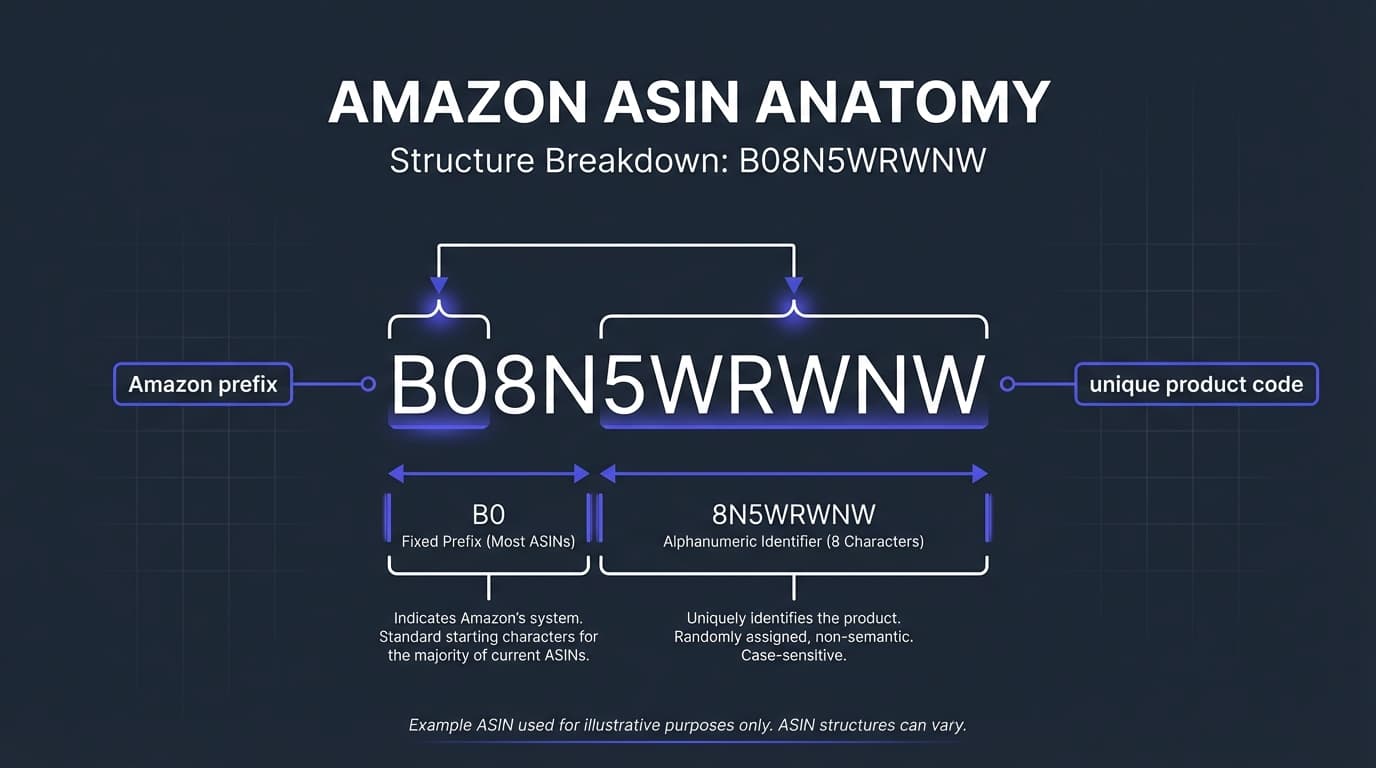
- Always 10 characters: A mix of letters and numbers
- Usually starts with "B0": Most ASINs begin with B0, though books use their ISBN-10 as the ASIN
- Unique per marketplace: The same physical product may have different ASINs on Amazon.com, Amazon.co.uk, Amazon.de, etc.
- One ASIN per product: Multiple sellers can list under the same ASIN
- Permanent: Once assigned, an ASIN doesn't change (though products can be removed)
ASIN Structure
While Amazon doesn't publish the exact ASIN format rules, the pattern is consistent:
- Standard products: B0 + 8 alphanumeric characters (e.g., B08N5WRWNW)
- Books: The 10-digit ISBN serves as the ASIN (e.g., 0134685997)—use our ISBN to ASIN converter for bulk book lookups
- Older products: Some legacy ASINs don't follow the B0 pattern

One Product, One ASIN
Amazon's catalog structure means that all sellers offering the same product share a single product detail page—and therefore a single ASIN. If 50 sellers offer the same brand of phone charger, they all list under one ASIN and compete for the Buy Box.
This is different from platforms where each seller creates their own product listing.
ASIN vs Other Product Identifiers
Amazon uses several identification systems. Understanding how they relate helps avoid confusion:
| Identifier | Full Name | Format | Scope | Purpose |
|---|---|---|---|---|
| ASIN | Amazon Standard Identification Number | 10 alphanumeric | Amazon only | Identify products on Amazon |
| UPC | Universal Product Code | 12 digits | North America | Retail product identification |
| EAN | European Article Number | 13 digits | International | Global product identification |
| ISBN | International Standard Book Number | 10 or 13 digits | Global | Book identification |
| SKU | Stock Keeping Unit | Varies | Seller-specific | Internal inventory tracking |
| FNSKU | Fulfillment Network Stock Keeping Unit | 10 characters (X00...) | Amazon FBA | Track seller-specific FBA inventory |
How These Identifiers Connect
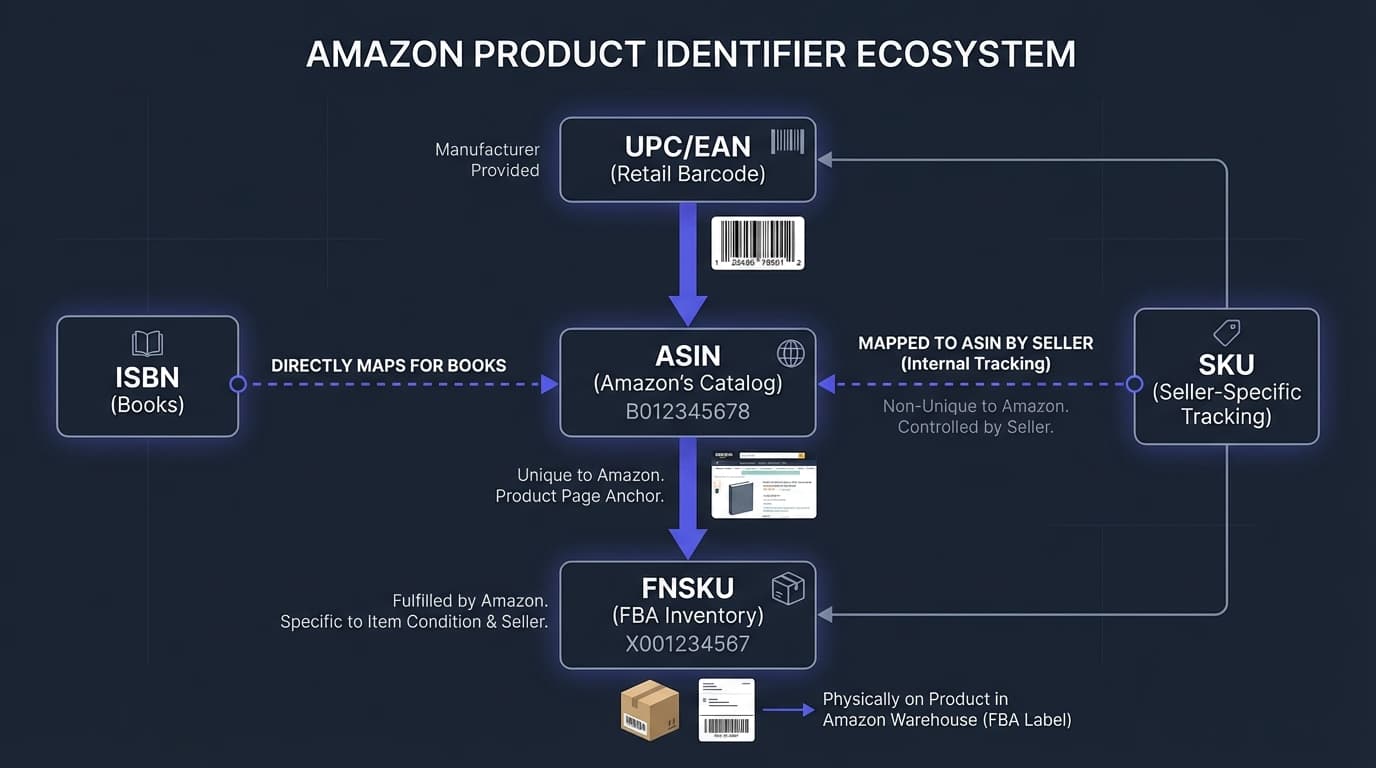
UPC/EAN → ASIN: When you list a product using its UPC or EAN, Amazon matches it to an existing ASIN (or creates a new one).
ASIN → FNSKU: When you send inventory to FBA, Amazon generates an FNSKU specific to your seller account and that ASIN.
SKU → Your choice: You create your own SKU for internal tracking. It can be anything meaningful to you.
How to Find an ASIN
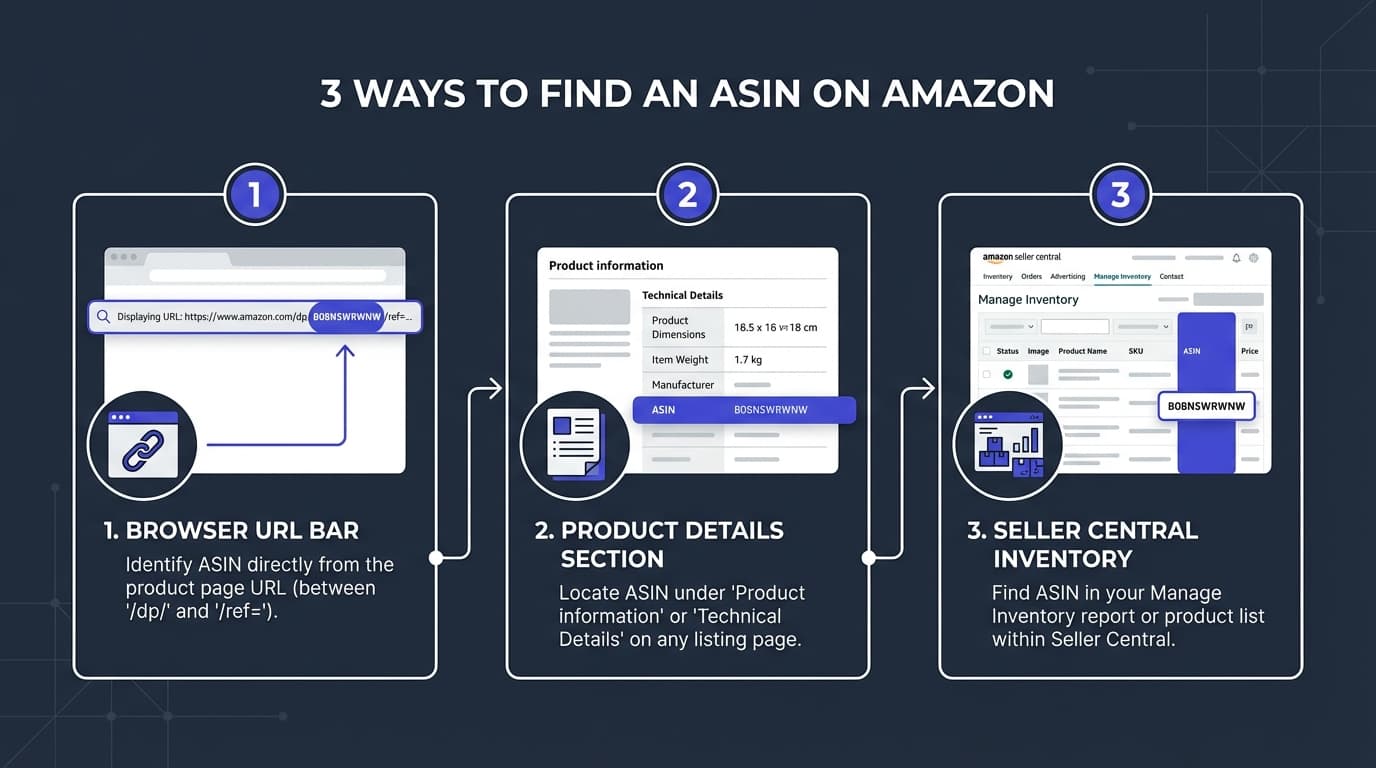
There are several ways to find an ASIN for any product on Amazon:
Method 1: From the URL
The easiest way—look at the product page URL. The ASIN appears after "/dp/" or "/product/":
https://www.amazon.com/dp/B08N5WRWNW
                              ^^^^^^^^^^
                              This is the ASIN
Method 2: From the Product Page
Scroll down to the "Product Information" or "Product Details" section:
- Look for "ASIN" in the specifications
- It's usually listed near the bottom alongside UPC, dimensions, and other details
Method 3: From Seller Central
If you're a seller:
- Go to Seller Central → Inventory → Manage Inventory
- Find your product listing
- The ASIN appears in the product details column
Method 4: Using Search
You can search Amazon directly by ASIN:
- Type the ASIN into Amazon's search bar
- Or use the URL format:
amazon.com/dp/[ASIN]
Why ASINs Matter for Amazon Sellers
Understanding ASINs is crucial for several aspects of running an Amazon business:
Product Research
ASINs enable precise product research:
- Competitor analysis: Look up specific ASINs to analyze pricing, reviews, and sales estimates
- Market research: Track ASIN performance over time
- Sourcing verification: Confirm you're sourcing the exact product you intend to sell
Listing Products
When adding products to your Amazon inventory:
- Match existing listings: Search by ASIN to add your offer to an existing product
- Avoid duplicates: Check if an ASIN exists before creating a new listing
- Bulk uploads: Use ASINs in flat files for efficient inventory management
Analyzing Supplier Price Lists
Wholesale suppliers often provide price lists with UPCs rather than ASINs. To analyze profitability on Amazon, you need to:
- Convert UPCs to ASINs
- Check current Amazon pricing
- Calculate fees and potential profit
This UPC-to-ASIN conversion is fundamental to wholesale product research. Our free UPC to ASIN converter handles up to 50,000 conversions per week—essential for analyzing supplier catalogs efficiently.
Tracking Competition
ASINs help you monitor your competitive landscape:
- How many sellers are on each ASIN you sell?
- Who has the Buy Box?
- What's the pricing history?
- Are there restrictions on the ASIN?
Common ASIN Scenarios and Questions
Can One Product Have Multiple ASINs?
Technically no—each unique product should have one ASIN. However, in practice:
- Variations: Different colors, sizes, or configurations of the same product have different ASINs but are grouped as variations
- Duplicate listings: Sometimes duplicate ASINs exist for the same product (Amazon works to merge these)
- Different marketplaces: The same physical product can have different ASINs on Amazon.com vs. Amazon.co.uk
What Happens If an ASIN Is Deleted?
ASINs can be suppressed or removed if:
- The product violates Amazon's policies
- There are safety concerns
- IP complaints are filed
- The listing quality is too poor
Once removed, the ASIN typically cannot be relisted. A new ASIN would need to be created.
Can I Create My Own ASIN?
You don't create ASINs directly—Amazon generates them. However, you can trigger ASIN creation by:
- Listing a new product that doesn't exist in Amazon's catalog
- Providing a valid UPC/EAN (or applying for a GTIN exemption)
- Completing all required listing information
Amazon then assigns an ASIN to your new product.
Do All Amazon Products Have ASINs?
Yes—every product on Amazon has an ASIN. This includes:
- Physical products
- Digital products (Kindle books, music, apps)
- Video content
- Some services
ASIN Restrictions and Gating
Not every ASIN is available for every seller. Amazon restricts some products. For a complete guide, see our Amazon Gated Brands & Categories Guide.
Types of Restrictions
- Category gating: Entire categories require approval (e.g., Grocery, Topicals)
- Brand gating: Specific brands require authorization to sell
- ASIN-level gating: Individual products may be restricted
Checking ASIN Restrictions
Before sourcing a product, verify you can sell it:
- Go to Seller Central → Catalog → Add Products
- Search for the ASIN
- Look for "Listing limitations apply" or similar messages
- Check if you can apply for approval
Many bulk scanning tools also show restriction status, saving you from sourcing products you can't sell.
Working with ASINs in Bulk
For wholesale and arbitrage sellers, managing ASINs at scale requires efficient processes:
Converting UPCs to ASINs
Supplier price lists typically include UPCs. For detailed methods, see our UPC to Amazon Lookup Guide. To analyze them:
- Manual: Search each UPC on Amazon (slow, impractical at scale)
- API access: Use Amazon's Product Advertising API (requires developer setup)
- Conversion tools: Use services that handle bulk UPC-to-ASIN conversion
RocketSource's free converter processes up to 50,000 UPCs per week, making supplier analysis practical.
Bulk ASIN Research
Once you have ASINs, bulk analysis tools can:
- Pull current pricing
- Estimate sales velocity
- Calculate FBA fees
- Check restrictions
- Determine profitability
This transforms a 5,000-product price list from weeks of manual work into an afternoon of analysis.
ASIN-Related Tools and Resources
Amazon's Built-in Tools
- Seller Central search: Find ASINs and check restrictions
- Revenue Calculator: Estimate fees for specific ASINs
- Add a Product: Search by ASIN to match existing listings
Third-Party Tools
| Tool Type | Purpose | Examples |
|---|---|---|
| UPC/ASIN Converters | Convert product identifiers | RocketSource |
| Bulk Scanners | Analyze supplier lists | RocketSource, Tactical Arbitrage |
| Browser Extensions | Quick ASIN data lookup | Various extensions |
| Repricing Software | Manage pricing across ASINs | Multiple options available |
Frequently Asked Questions
Is an ASIN the same as a UPC?
No. A UPC (Universal Product Code) is a standardized barcode used across retail. An ASIN is Amazon-specific. Many products have both—the UPC on the physical packaging, and an ASIN in Amazon's system. Amazon uses UPCs to match products to ASINs.
Can I sell on Amazon without an ASIN?
No. Every product on Amazon needs an ASIN. If you're selling an existing product, you match to its ASIN. If you're selling something new, Amazon creates an ASIN when you list it.
Do ASINs transfer between Amazon marketplaces?
Generally no. Amazon.com and Amazon.co.uk (for example) are separate catalogs. The same physical product often has different ASINs in different countries. For international products, use our EAN to ASIN converter to find the correct ASIN for each marketplace. Amazon has been working on global catalog initiatives that may unify some products over time.
What's the difference between ASIN and FNSKU?
An ASIN identifies the product. An FNSKU identifies your specific inventory of that product in Amazon's fulfillment centers. FNSKUs are seller-specific—two sellers with the same product have the same ASIN but different FNSKUs.
How do I find the UPC from an ASIN?
Check the product page's "Product Information" section—the UPC is often listed there. For bulk reverse lookups, specialized tools can convert ASINs back to UPCs. Our ASIN converter supports both directions.
Why can't I find an ASIN for a product I know exists?
Possible reasons:
- The product might be in a different Amazon marketplace
- The listing could be suppressed
- You might have a typo in the ASIN
- The product may have been removed
Next Steps
Now that you understand ASINs, put this knowledge to work:
- Free UPC to ASIN Converter — Convert supplier UPCs to Amazon ASINs
- Free EAN to ASIN Converter — Convert international barcodes to ASINs
- Free ISBN to ASIN Converter — Look up book ASINs in bulk
- What Is a GTIN? — Understand the global barcode system
- Amazon Barcode Types Explained — UPC, EAN, FNSKU, and more
- Amazon Wholesale Guide — Build a profitable wholesale business
Ready to analyze products at scale?
Start Free with RocketSource →
Convert up to 50,000 UPCs to ASINs per week, analyze supplier price lists, and find profitable products—no credit card required.