Amazon Gated Brands and Categories: How to Get Ungated (2026)
One of the most frustrating experiences for new Amazon sellers is finding a profitable product, sourcing inventory, and then discovering they can't actually list it for sale. Amazon "gates" certain brands, categories, and even individual products, requiring approval before you can sell.
Understanding gated products is essential for avoiding wasted time and money. This guide explains what gating means, why Amazon does it, and how to get approved—or find profitable alternatives.
What Does "Gated" Mean on Amazon?
When a product is "gated" or "restricted," Amazon requires you to apply for and receive approval before you can list that product for sale. Without approval, you cannot create a listing or sell under an existing listing.
"Gated" and "restricted" are used interchangeably—they mean the same thing.
What Gating Looks Like
When you try to list a gated product in Seller Central, you'll see messages like:
- "Approval required"
- "You are not approved to list in this category"
- "Application required"
- "Listing limitations apply"
Sometimes you can apply immediately. Other times, the "Apply" button is grayed out or the brand simply isn't accepting new sellers.
Why Amazon Gates Products
Amazon implements restrictions for several legitimate reasons:
1. Brand Protection
Brands request gating to prevent unauthorized sellers and counterfeits. Major brands like Nike, Apple, and Disney don't want random sellers listing their products without verification.
2. Customer Safety
Some products pose safety risks if sold improperly. Topicals (skin creams), supplements, and baby products require sellers who follow proper handling and storage.
3. Regulatory Compliance
Products like pesticides, medical devices, and certain electronics have legal requirements. Gating ensures sellers meet these standards.
4. Counterfeit Prevention
High-value, frequently counterfeited items get gated to protect customers from fake goods.
5. Quality Control
Some categories have had quality issues or high return rates. Amazon restricts them to maintain customer trust.
Types of Amazon Restrictions
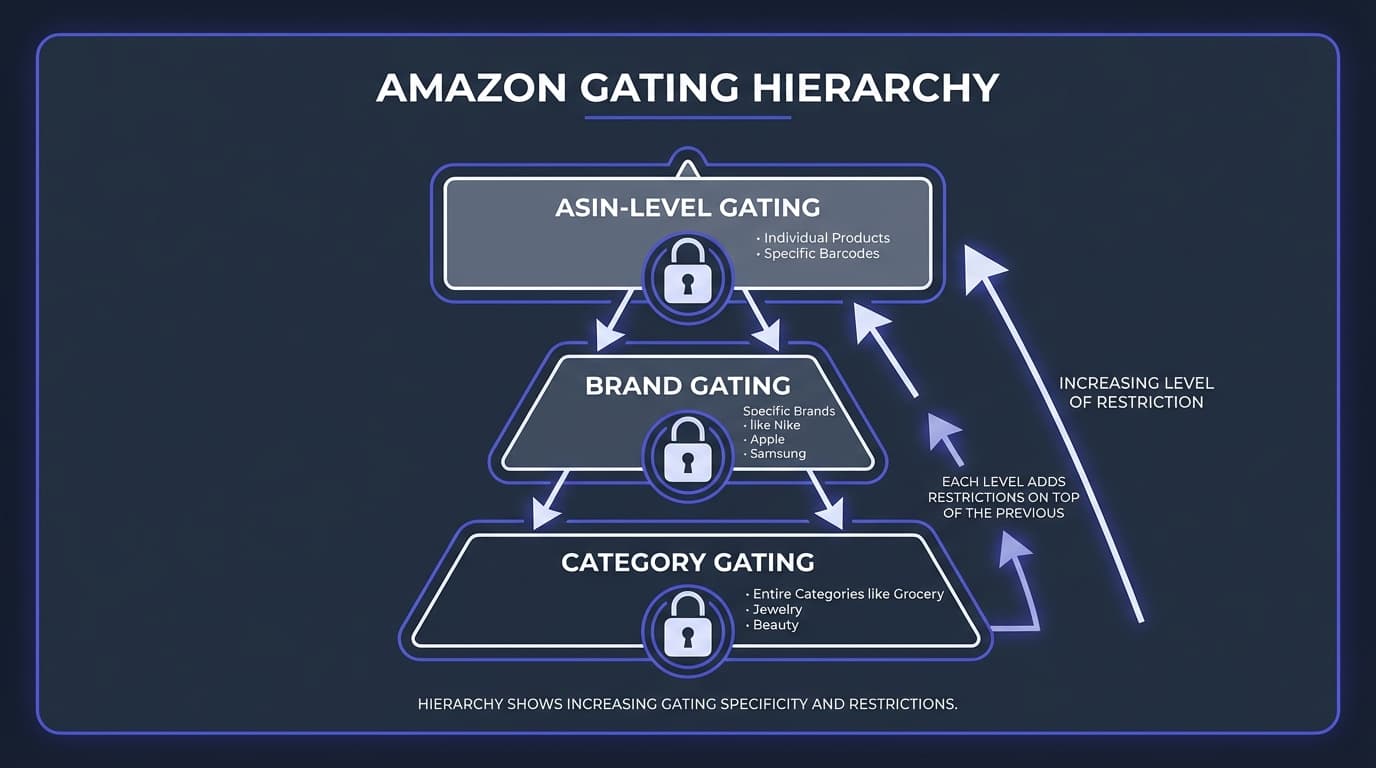
Gating happens at three levels, and understanding the difference helps you plan:

Category Gating
Entire product categories require approval. All products within the category are restricted until you're approved for that category.
Examples:
- Grocery & Gourmet Food
- Topicals (skin products)
- Jewelry
- Watches
- Fine Art
- Collectible Coins
How to identify: When you try to list any product in the category, you see category-level approval requirements.
Brand Gating
Specific brands require approval, regardless of what category they're in. Even if you're approved for the category, you still need brand approval.
Examples of commonly gated brands:
- Nike
- Adidas
- Apple
- Sony
- Lego
- Disney
- Hasbro
- YETI
- Beats
How to identify: You're approved for the category but see brand-specific restrictions when trying to list.
ASIN-Level Gating
Individual products are restricted even when the category and brand are open. This is often due to specific product issues or brand requests.
Examples:
- Specific high-counterfeiting-risk products
- Products with past safety complaints
- New product launches with temporary restrictions
- Products enrolled in Amazon's Transparency program
How to identify: Category and brand are fine, but the specific ASIN shows restrictions.
How to Check If a Product Is Gated
Check restrictions BEFORE sourcing. Nothing is worse than buying inventory you can't sell.
Method 1: Seller Central (Most Reliable)
- Log into Seller Central
- Go to Catalog → Add Products
- Search for the product by ASIN, UPC, or product name
- Look at the listing action:
- "Add product" = You're approved
- "Apply to sell" = Application required
- "Listing limitations apply" = Restricted
Method 2: Amazon Seller App
- Open the Amazon Seller app
- Use the camera to scan the product barcode
- Check the product details for restriction indicators
- Green checkmark = Can sell; Yellow/Red indicators = Restrictions apply
Method 3: Bulk Scanning Tools
For wholesale sellers analyzing supplier lists, manual checks don't scale. Use bulk UPC lookup methods to check restrictions across thousands of products simultaneously.
When analyzing supplier price lists with RocketSource, restriction status is included—so you don't waste time on products you can't sell.
Method 4: Browser Extensions
Some Amazon seller extensions show restriction indicators directly on Amazon product pages while you browse.
Most Commonly Gated Categories
Here's an overview of categories that typically require approval:

| Category | Difficulty | Common Requirements |
|---|---|---|
| Grocery & Gourmet | Medium | Invoices, sometimes FDA documentation |
| Beauty | Medium | Invoices from authorized distributor |
| Topicals | Hard | FDA registration, invoices, product testing |
| Health & Personal Care | Medium | Invoices, varies by subcategory |
| Toys & Games (Holiday) | Seasonal | Sales history, metrics requirements during Q4 |
| Jewelry | Medium | Invoices, quality standards compliance |
| Watches | Hard | Brand authorization, authenticity proof |
| Automotive | Easy-Medium | Often just invoices |
| Music & DVD (Collectibles) | Hard | Varies; some subcategories closed |
| Fine Art | Very Hard | By invitation only |
Seasonal Restrictions: Toys in Q4
Amazon restricts the Toys & Games category during the holiday season (typically October through early January) for sellers who don't meet performance thresholds:
- Sales history: Must have sold toys before the cutoff date
- Account metrics: Order defect rate, cancellation rate, late shipment rate must be excellent
- Account age: Newer accounts face stricter requirements
Strategy: If you plan to sell toys during Q4, sell in the category earlier in the year to establish history.
How to Get Ungated
The ungating process varies by category and brand, but follows a general pattern:
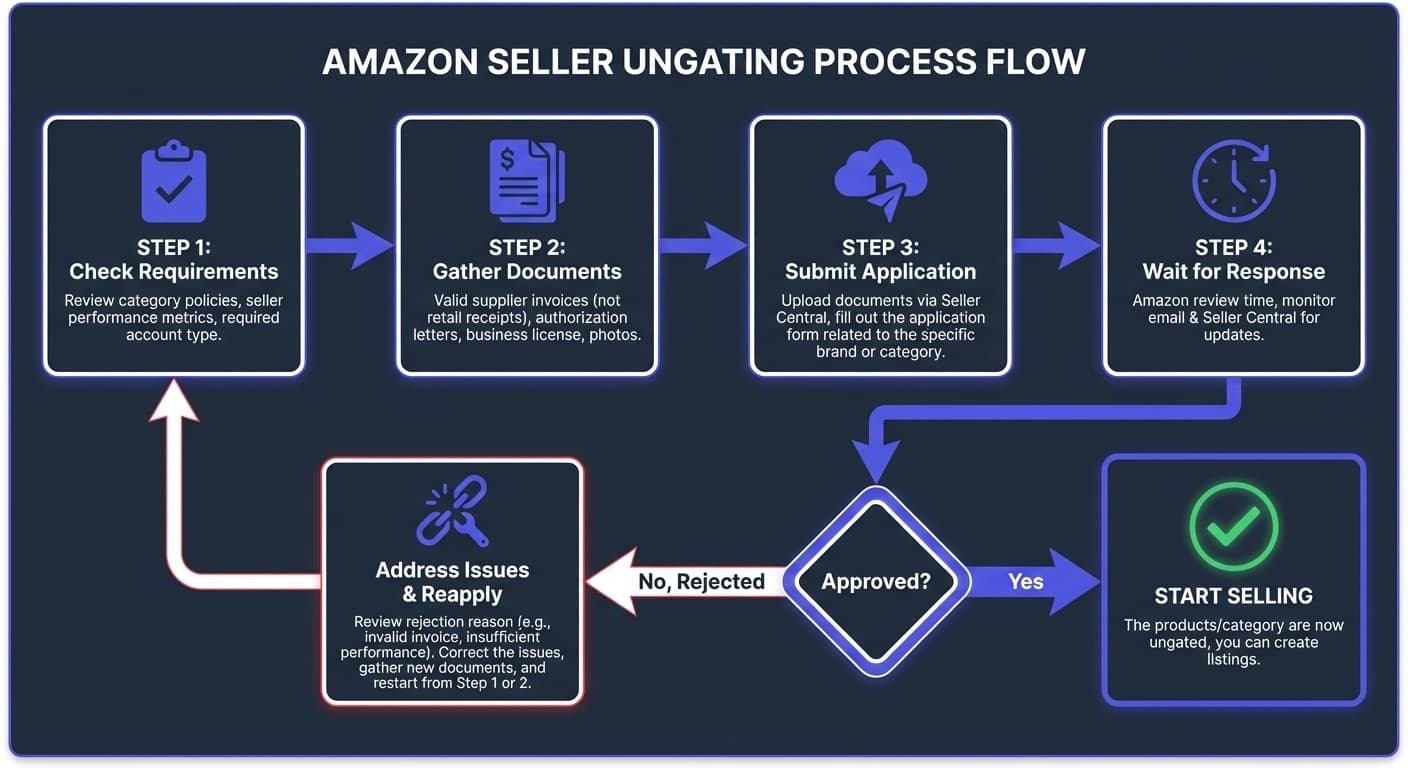
Step 1: Check Current Requirements
- Go to Seller Central → Add a Product
- Search for the restricted product
- Click "Apply to sell" or "Request approval"
- Amazon shows what's required
Note: Requirements change. What was required six months ago may be different today.
Step 2: Gather Required Documents
The most common requirement is invoices from an authorized source:
Invoice Requirements
- Dated within 180 days (sometimes 90 days)
- From an authorized distributor or manufacturer
- Minimum quantity: Usually 10+ units of the brand/products
- Business name and address matching your seller account
- Supplier contact information
- Product names and quantities clearly listed
What Makes an Invoice Valid
- Professional format (not handwritten)
- Supplier's company information
- Invoice number
- Date
- Line items with product names/descriptions
- Quantities
- Your business name and address as buyer
Step 3: Submit Your Application
- Return to the "Apply to sell" page
- Upload required invoices (PDF or image format)
- Complete any additional questions
- Submit the application
Step 4: Wait and Follow Up
- Processing time: Hours to several days
- Approval: You can now list the product/brand/category
- Rejection: You'll receive a reason; address it and reapply
- More info requested: Amazon may ask for additional documentation
Tips for Successful Ungating
Source from Authorized Distributors
Amazon wants to see that your products come from legitimate sources. Authorized distributors have relationships with brands and can provide invoices Amazon accepts.
What to ask distributors:
- "Can you provide invoices on company letterhead?"
- "Do your invoices include product names and quantities?"
- "Have other sellers used your invoices to get ungated on Amazon?"
Build Relationships with Multiple Suppliers
Having multiple supplier relationships gives you flexibility:
- Different suppliers may carry different brands
- Some suppliers' invoices work better for ungating
- Backup options if one supplier can't provide proper documentation
Start with Easier Brands
Some brands are easier to get ungated than others. Within a category, try:
- Lesser-known brands first
- Brands with less counterfeiting history
- Brands that haven't specifically requested strict gating
Success with easier brands can establish history that helps with harder ones.
Maintain Good Account Health
Amazon is more likely to approve sellers with strong metrics:
- Order defect rate below 1%
- Late shipment rate below 4%
- Pre-fulfillment cancel rate below 2.5%
- Valid tracking rate above 95%
Consider Wholesale Over Retail Receipts
While some sellers have had success with retail receipts (from stores like Walmart), Amazon prefers wholesale invoices. Wholesale documentation shows:
- Larger quantities (suggests legitimate business)
- Business-to-business transaction
- Ongoing supplier relationship
What to Do If You Can't Get Ungated
Sometimes you won't get approved. Here's how to pivot:
Option 1: Find Alternative Products
Within the same niche, look for:
- Similar products from ungated brands
- Generic or unbranded alternatives
- Related accessories that aren't restricted
Option 2: Wait and Improve
Gating changes over time:
- Build account history and metrics
- Establish relationships with better suppliers
- Try again in 3-6 months
Option 3: Focus on Unrestricted Products
Many profitable products have no restrictions at all. Concentrate your efforts where you can actually sell.
When analyzing supplier price lists with bulk scanning tools, filter out restricted items early—don't waste analysis time on products you can't sell.
Option 4: Sell on Other Platforms
If Amazon restricts a product, you might still sell it on:
- eBay
- Walmart Marketplace
- Your own website
- Other e-commerce platforms
Common Ungating Mistakes to Avoid
Using Fake or Altered Invoices
Don't do this. Amazon verifies invoices, often by contacting suppliers. Fake invoices lead to account suspension.
Buying from Unauthorized "Ungating Services"
Services claiming to "guarantee ungating" often provide questionable invoices. Short-term success isn't worth the long-term risk to your account.
Applying Without Proper Documentation
Rejected applications may count against you. Only apply when you have proper documentation that meets Amazon's requirements.
Ignoring Invoice Details
Small issues get applications rejected:
- Name mismatch between invoice and seller account
- Missing contact information for supplier
- Invoice too old
- Quantity too low
Gating and Your Sourcing Strategy
Build gating awareness into your sourcing workflow:
For Retail Arbitrage
- Scan products with the seller app
- Check restriction status immediately
- Only buy products you can actually list
- Don't assume you can "figure it out later"
For Wholesale Sourcing
- Use bulk tools that show restrictions (like RocketSource)
- Filter out restricted products during analysis
- Note which brands/categories you're not approved for
- Work on getting ungated for high-potential restricted products
For Business Planning
- Don't count on restricted products in your projections until you're approved
- Build ungating into your growth plan (which categories to pursue when)
- Budget time for the ungating process
Frequently Asked Questions
How long does ungating take?
It varies widely. Some applications are auto-approved in minutes. Others take days for review, especially during busy periods. Complex cases (brand-specific restrictions) can take longer.
Do I need to get ungated for every brand in a category?
Category approval lets you sell in the category. Brand-level gating is separate—you may need additional approval for specific brands even after category approval.
Can I get ungated without buying inventory first?
Sometimes. Some categories auto-approve based on account metrics alone. Others require invoices, which means purchasing products first. Check the specific requirements before buying.
What if my supplier doesn't provide proper invoices?
You'll need a different supplier for ungating purposes. Look for authorized distributors who can provide documentation Amazon accepts.
Do restrictions apply to FBM and FBA equally?
Yes. Gating restricts your ability to list products regardless of fulfillment method. You can't bypass restrictions by choosing FBM over FBA.
Can restrictions change after I'm approved?
Generally, once you're approved, you stay approved. However, Amazon can change policies. New brands may request gating. Categories may add requirements.
Next Steps
- Free UPC to ASIN Converter — Convert supplier UPCs to Amazon ASINs
- Free EAN to ASIN Converter — Convert international barcodes to ASINs
- Free ISBN to ASIN Converter — Look up book ASINs in bulk
- Amazon Wholesale Guide — Build a profitable wholesale business
- How to Find Wholesale Suppliers — Source from authorized distributors
- What Is an ASIN? — Understand Amazon product identifiers
- Amazon Barcode Types Explained — UPC, EAN, FNSKU, and more
Want to analyze supplier lists while filtering out restricted products?
Start Free with RocketSource →
Upload supplier price lists, see restriction status for every product, and focus your time on products you can actually sell—50,000 free conversions per week, no credit card required.